This is an old problem and apparently still unresolved: when an email contains a link, the corresponding page doesn’t open when I click on it. Nothing happens at all. This happens 100 per cent regardless of which browser is set as the default. I’ve tried it with Safari, Brave, DuckDuckGo and Edge. I think that should be enough.
Does anyone have any tips on how I can sort this out?
(I could, of course, use a different programme, but it seems to me there isn’t a better one for email on a Mac – which is, of course, because there isn’t a good one available for this environment…)
One more thing: when I open the same emails in Apple Mail or Thunderbird, the links work fine, just as you’d expect. So it seems to be a long-standing issue with Em Client that hasn’t been addressed. (I’m just too lazy to get used to a different programme, so I’m still hoping something can be done about it.)
Also on a Mac: very strange, I had never noticed as I usually follow up on links in the browser’s webmail interface before downloading the mails in eMC. So I just did a test with links embedded in mails from six different senders, they all opened as they should. Maybe your OS?
OTH, I get the reverse issue with two Firefox clones which, as opposed to Firefox itself, won’t open a mail link. But that’s a different story.
I use eM Client on two Mac systems and one Windows system, and have not seen this issue. I just clicked a link in eM Client 11 on the MacBook Pro I am working on at the moment, and it opened a new browser tab in Safari with the content. It has worked with eM Client 10 and earlier as well.
So to me, it sounds like something in your system configuration or the configuration of eM Client? I hope someone has some ideas of what to look at.
One thought, if no one else comes up with something better - create a new user account on your Mac just as a temporary test, and setup eM Client with one mail account on that user, and see if the problem persists. This would give you a clean user and eM Client configuration.
The problem only occurs with em client and is completely independent of which browser is set as the default. It seems quite clear to me that the problem must lie with em client. Perhaps something is configured incorrectly. But surely not in the system, which otherwise runs without any issues. Incidentally, ChatGPT has confirmed that this problem occurs sometimes and that it regularly proves to be unsolvable.
It’s not actually that important, really. But I do appreciate working with tools that don’t force me into the strangest contortions, especially when such contortions are completely unnecessary for other tools because they simply work as one would expect.
Whats an example of an embedded link that won’t open ? Or an email url we can d/l to test ?
Also do you have an existing forum thread to this specific issue ?
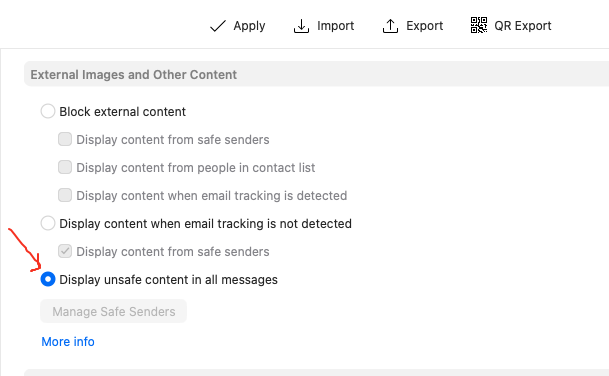
Also have you tried (for a test) setting your eM Client Privacy to “Display unsafe content in all messages” to determine if you might have blocked the senders email external content links ?
eM Client Privacy Settings “Menu / Settings / Mail / Privacy”
There’s no need for an example. The problem affects all links embedded as images (buttons, etc.). If I’ve counted correctly, there are at least three threads in this forum about the issue, and more elsewhere.
For the time being, I’m going to put this issue to one side and try out Thunderbird for a while. This app can open such links without any problems and, apart from that, has a number of features that I appreciate in em client, without the various quirks that have been annoying me for a long time. At least, that’s how it looks so far.
When I suggested that it might be related to your OS… Having messed around with Mac OSs for over 30 years, I know for certain that there are countless OS-specific quirks. Not only: having two machines, same model, same OS, pretty much same settings, each one of them manifests quirks (hardware and software) that the other one doesn’t.
I personally using eM Client official release V11.0.1054 with a Mac and OS 27.0.1 have no issues clicking any embedded links in emails at all so need an exanple of the problem.
It could be something in your OS as @tingo suggested interferring or it could be your specific senders email has some eg: custom non standard code in it that is causing the embedded links not to open in eM Client. So would need an example to see where the problem lies.
If you don’t have a Public URL email link we can test, then if you have a current active paid license go to “Menu / File / Export” and export an example email of the embedded link problem as a (.eml) to a folder on your desktop, and then go to the VIP support page and login and lodge a support ticket and attach the .eml message file to be investigated.
If I’ve counted correctly, there are at least three threads in this forum about the issue, and more elsewhere.
That may well be the case, but it’s extremely unlikely, because the problem doesn’t occur with other email programmes on the same operating system and the same computer. If a problem only occurs with one programme, but can be reproduced consistently with that programme, I don’t assume it’s down to the operating system, but rather that it’s specifically down to the programme that isn’t working. (If all my speakers are working perfectly but one isn’t, I don’t assume that I need to replace all the speakers or go to an ear specialist, but rather that it is that particular speaker that is the problem.)
Then if you can link an exported .eml message as an example of the problem to this thread, then we can see if we can replicate the problem and possible see then why the embedded links won’t open. Or otherwise as i said send it into official support via lodging a ticket who will investigate it.