Yahoo just nailed me by changing their Yahoo Plus from 5TB to 200GB, so I am shopping for an email client.
I just downloaded v10.
I have an existing Yahoo account with emails in folders.
I would like to download my emails and folders from the server, and then I them deleted from the server after a few days.
How do I do that?
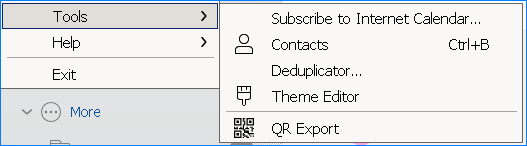
I found some posts about this, but the UI appears different…
The following answer was created with Perlexity.ai, which was much faster than typing it by myself:
How to automatically archive emails locally in eM Client:
Open eM Client.
Go to Menu → Tools → Settings → Mail → Automatic Archiving.
Enable the option for automatic archiving.
Select which accounts and folders you want to archive (e.g., only Inbox or all folders).
Specify after how many days emails should be archived (for example, emails older than 180 days).
Optionally, set how often archiving should take place (e.g., every 7 days).
You can also start archiving manually by clicking “Run Archiving Now.”
You will find the archived emails in a special Archive folder in the folder list on the left in the program. These are stored locally and are available even without an internet connection.
Important notes:
Local archiving downloads the emails from the server and deletes them from there, so they exist only on your computer.
Server archiving (“Move to Archive”) is only available for Google accounts; it simply removes the “Inbox” label but keeps the email on the Google server.
For additional data security, you can make regular backups via Menu → File → Backup.
You can freely choose where your archive and backup files are stored, including on network drives or in the cloud.
These are the main steps to locally archive your emails in eM Client and remove them from the mail server.
is the correct location, perhaps a good reason NOT to rely on AI
particularly when the AI used doesn’t know how to spell its name,
it is PERPLEXITY and not as shown - the “P” is missing
¡Buena suerte!
skybat
¡Saludos desde Sevilla la soleada en España!
¡Mis mejores deseos y mantente a salvo!