Is there any way to download a GMAIL Email and instruct server to “NOT” mark it as read on the server?
Thanks
Is there any way to download a GMAIL Email and instruct server to “NOT” mark it as read on the server?
Thanks
Think of eM Client as a sophisticated webmail interface. The same as when you read a message in webmail it is marked as read on the server, if you read it in eM Client it is marked as read on the server. You can’t have the message marked as unread on the server, and marked as read in webmail.
So one option if you don’t want it to be marked as read . . . . don’t read it. 
Or you can mark it as unread again after you have read it. I do that sometimes rather than snoozing the message (paid license feature) so it shows up as a new message later, I just mark it as unread. Then there is still a visual queue that I have something that needs attention in that folder.
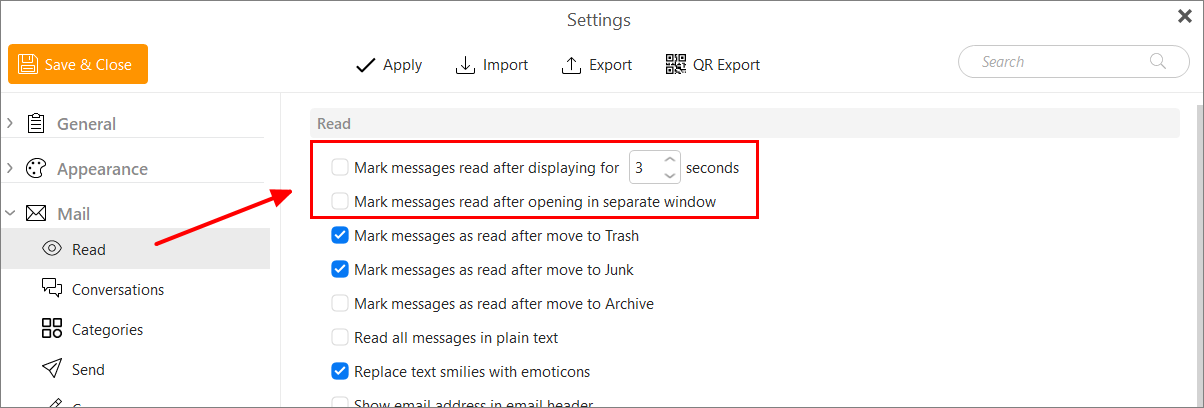
Or you can disable messages being marked as read by unselecting the option in Menu > Settings > Mail > Read. Then if you want them marked as read, you will need to manual mark them as read.
Thank you for the prompt and comprehensive reply. My needs are temporary. I am in the process of converting from Thunderbird to emClient and fearful that until I have completely switched over an Email or two may fall through the cracks. Not that important. However, your final suggestion would probably do the trick.