I just updated to v11.0.1201 on my PC. After the update, my desktop pop-up notification sound changed. Even though I have the notifications set for a custom sound, eM Client ignores that setting and plays the canned sound. I have not updated eM Client on my laptop. The old version there plays the custom sound. The error clearly is in the updated version. How can I get it to play the sound I have specified in the program settings for notifications?
That action was normal - the default settings were changed by the update. Most likely, the sound file that you had is still where you put it. Open the SETTINGS and navigate to the OTHER tab. Use the SELECT button to locate the same sound file you used before. Make SURE that you SAVE & CLOSE after selecting this file You may need to restart the client for this to work.
Your suggestion failed to solve the problem. Is there any way to revert back to the previous version that worked properly?
I just updated to v11.0.1201 on my PC. After the update, my desktop pop-up notification sound changed. Even though I have the notifications set for a custom sound, eM Client ignores that setting and plays the canned sound.
See my post in the following thread for how to get custom sounds working for new mail in V11 for Windows
just found this - pain in the arse - i think booting with linux may allow the file to be changed in the app folder - not tried it but should work - are you getting notifications on the taskbar - i am not - popups work if i turn that on but thats just at that moment - the envalope icon shows if mails are unread
None of these “solutions” has worked. The pop-up still plays a generic sound rather than the sound I have specified. How can I revert back to v10? That worked with the sounds; v11 does not. Why did the programmers tinker with something that already worked the way users liked it?
None of these “solutions” has worked. The pop-up still plays a generic sound rather than the sound.
The only issue I’m still aware of is with the Incoming custom sound on the Mac with V11.0.1267 & OS27.0.1. Still none work at all in any format.
But eM Client V11.0.1267 does work for me personally with custom sounds using Windows 11 Pro.
Is there any way to revert back to eM Client v10
Yes you can revert back to V10
If you have a recent backup of V10 prior to upgrading to V11, “close eM Client” and “rename the following hidden database” to eg: eM Client-V11
- Windows: C:\Users%username%\AppData\Roaming\eM Client`
- MacOS: /Users/User Name/Library/Application Support/eM Client`
Then “uninstall eM Client” and then “reinstall the latest eM Client V10.4.5674” from the release history page. Or if you still have the V10 install file on your hard disk reinstall it from there.
Then once reinstalled “skip the setup” and restore your V10 backup via “Menu / File / Restore”. Any new emails, etc since the restore date will update when eM Client reconnects.
If you don’t have a V10 backup and have an IMAP, Exchange, Graph, Office 365 or iCloud account then “close eM Client” and “rename the V11 database” and uninstall eM Client and reinstall V10 and “setup as new”. All your emails, calendar, contacts, tasks etc will come back from the server once eM Client reconnects.
If you have a POP account or messages in Local folders, and no V10 backup, then before closing eM Client V11, go to “Menu / File / Export” and export all your emails, contacts, calendar, tasks etc to a folder on your desktop to then reimport back later once you have V10 reinstalled and setup again via “Menu / File / Import”.
The proper sound plays when I’m viewing the eM Client window. The problem is with the sound that plays when I get a desktop notification. Is there a different setting for just the desktop notification?
I think it’s too risky to try to change versions. I am afraid of losing all of my emails if I do something wrong. Maybe I’ll just have to accept the generic sound and call it done.
The proper sound plays when I’m viewing the eM Client window. The problem is with the sound that plays when I get a desktop notification. Is there a different setting for just the desktop notification?
No there is no separate incoming email notification sound setting for the eM Client taskbar icon.
Whether the program is open in focus, or open behind another program, or minimized to the taskbar “its the same custom sound setting” as per my V11 example screenshot below.
Note:- The only thing i notice is that “after you add the sound file and save settings” the path most of the time doesn’t show again, but it does still play for me anyway with Win 11 Pro / (26H2).
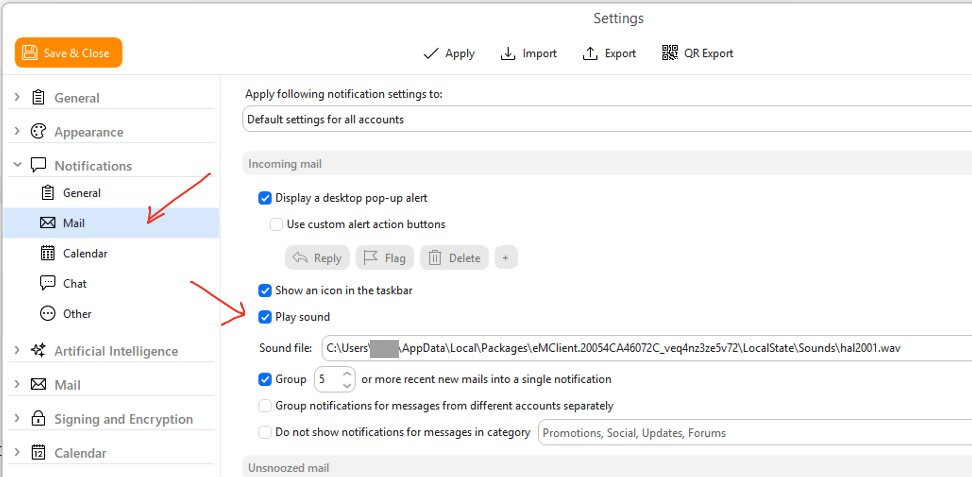
My setting in the Notifications tab is identical to yours. I’m running Windows 11 Home. For some reason, eM Client is ignoring my sound setting and using the generic sound.
For some reason, eM Client is ignoring my sound setting and using the generic sound.
Have you tried all different sound formats ?
Also might be the audio encoding.used.
I can choose from the canned sounds (chime.wav, ding.wav, ring.wav, and swoosh.wav), but I cannot add my own sound file to the folder
C:\Program Files\WindowsApps\eMClient.20054CA46072C_11.0.1267.0_x64__veq4nz3ze5v72\Sound
I have tried everything possible to gain access to the WindowsApps folder, but it will never let me add a file. My computer says I don’t have permission.
Why didn’t the update copy my sound files from the old version of eM Client?
I cannot add my own sound file to the folder
C:\Program Files\WindowsApps\eMClient.20054CA46072C_11.0.1267.0_x64__veq4nz3ze5v72\Sound
Add them to your LocalState\Sounds folder as per below example below. That’s just a normal hidden folder and doesn’t need special access.
C:\Users\user\AppData\Local\Packages\eMClient.20054CA46072C_veq4nz3ze5v72\LocalState\Sounds\
I did everything you said. The only sound file I have in that folder is my preferred sound. eM Client still ignores that and uses the default sound.
Have you tried different audio formats and / or different audio encoding ?
I finally figured out the solution. When I went to Settings>Notifications>General, I noticed that there were two option bubbles under “Notification Method.” The default that was selected was “System notifications.” The other option was “Custom notifications.” As soon as I selected “Custom notifications,” the desktop updates used my preferred, selected sound file.
Thank you @cyberzork for all of your help and suggestions.
Thanks. I have been having trouble with this since I installed V11. The whole method for selecting sounds has got more complicated with the new release.