Work machine.I have a license for v9. I reinstalled operating system. Installed emclient v10. Entered my reg code it said that its valid for v9 only. After removing 10 and reinstalling 9 it tells me that my database has been updated by a more recent version. My options are to upgrade to v10. I do not want to. Is there any way to get my database back to version 9?
I do not want to. Is there any way to get my database back to version 9?
This is the offical eM Client support link how to downgrade back to eM Client V9 or older.
Or alt you could instead choose to update your V9 license to V10 via the below link and get all subsequent V10 updates.
.
https://www.emclient.com/upgrade-emclient-license.aspx
Or alt you could instead update your V9 license to Lifetime Upgrades, where you’ll get all future versions and updates of eM Client via the below.
Thank you for the reply. Although the link you provided for downgrading does not exist.
I searched on that and found How can I downgrade back to eM Client 9, eM Client 8 or older? - Powered by Kayako Help Desk Software . The instructions say to export data. Then downgrade and import the exported data. When i launch V9 it does not let me even start the application. I have 2 options Update to 10, or exit.
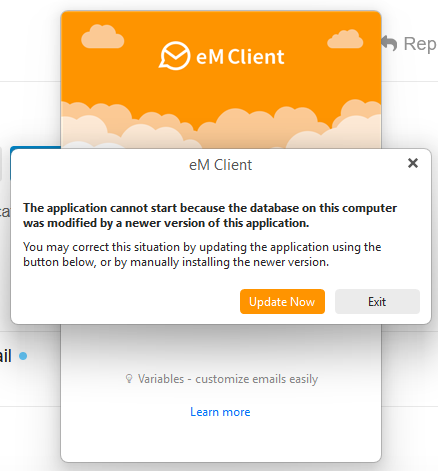
I just noticed it says to rename the database. I will attempt this.
Just for information. This turned out to be impossible to fix. The instructions say rename your database. It does not say specifically what files are the db files. So i renamed the entier Emclient folder in /user/appdata/roaming. Installed 9 and tried to import. Had no idea what files to use for import. Uninstalled / Reinstalled 10. Exported all the data to files. Uninstalled / Reinstalled 9. Attempted to import and it tells me the data is too new and cant import. Wasted 2 hours of my life. Purchased license for 10. Pretty much forced to purchase as no ablity to downgrade. Not real happy but this is done.