When adding a new event to my calendar I prefer to simply click on the time and start to type the event. This works as long as the firts letter of the event is not the same as one of the pre-set shortcuts in the Calendar view. For example, if I wanted to add event “Wash the Dog”, it would switch the view to Week instead of creating a new event.
I do not see any way to customize the shortcuts in the Settings/General/Shortcuts commands. Am I missing something?
I don’t tend to use shortcuts because my memory isn’t good enough to remember them anyway, so is there a way to disable the shortcuts all together?
I do not see any way to customize the shortcuts in the Settings/General/Shortcuts commands. Am I missing something?
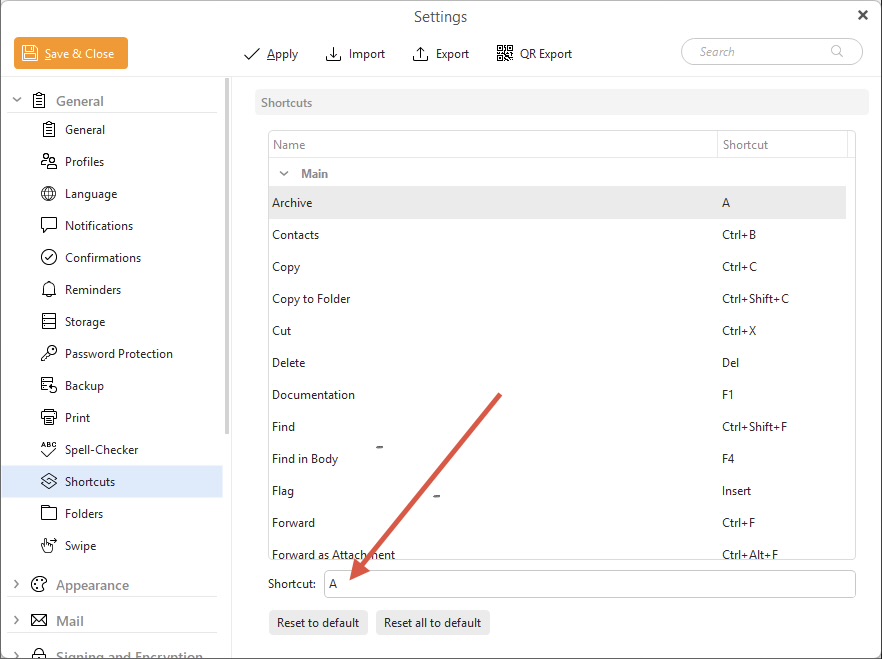
To change a shortcut, click on it “and at the very bottom” you will see a field with the shortcut. As per example screenshot below.
Delete it and type your shortcut key/s. If it won’t change and nothing else is using that shortcut key combo “go to the far right of the field” to del & change as I had to do with modifying shortcuts.
Thanks for your reply, Cyberzork. Sorry for the long delay in getting back to this.
I was aware of this setting however, my screen does not display a ‘Main’ grouping. I only see ‘General’, ‘Message Detail’, and ‘Message Compose’.
Furthermore, more importantly, there are no settings for the Calendar screen. For example, when the calendar tab is selected, I see the following items options at the top; “Day” with ‘y’ designated as a shortcut, “Work Week” with ‘r’ designated as a shortcut, “Week” with ‘W’ designated as a shortcut, etc.
None of those appear in the settings panel and I see no way to make a shortcut specific to a calendar entry.
Those shortcuts might be then hard coded and not changeable if you carnt change them in the Settings / Shortcuts. Other users or support might comment on that if they are changeable.