Can notification action buttons be customized?
Hello,
I have a question about desktop notifications in eM Client.
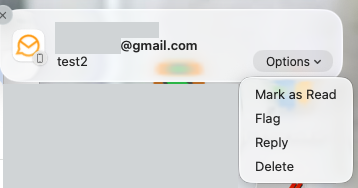
When a new email notification appears, I currently see actions like:
Is it possible to customize these buttons somehow?
For example, I would prefer:
- Delete
- Mark as Read
- Reply
I almost never use “Forward” directly from notifications, and “Mark as Read” would be much more useful for me.
Maybe I missed some setting, plugin, or hidden option?
Thank you.
1 Like
Is it possible to customize these buttons somehow?
No you carn’t currently modify what displays on the desktop notifications.
There is a sleekplan suggestion though for the desktop you can vote for to hopefully in the future modify the notifications and have a “Mark as read” or other options.
Interestingly on the mobile app on eg: iOS when you get the email notification there is a “Mark as Read”, Flag, Reply and Delete option but i guess thats due to the IOS system is different.
1 Like
Thank you for your reply and for the information. I’ve added my vote to the suggestion.
I also know that on mobile devices (for example iOS) this can already be customized and offers actions like “Mark as Read”, which is very useful.
Hopefully this reasonable functionality will eventually make its way to Windows notifications as well in the future.
2 Likes