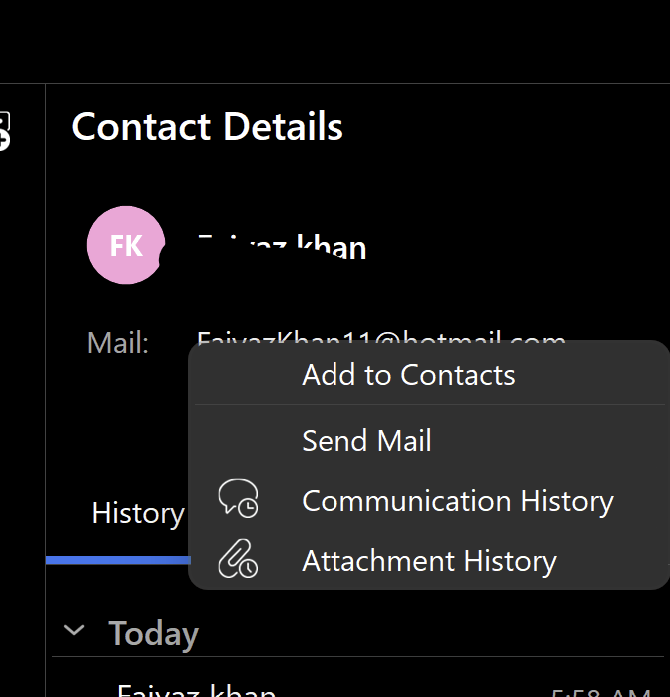
There is currently no way to copy an email address in the contact sidebar. I do know there are other ways to get to it, but I often find myself right clicking on the email address under contact details, and not seeing a copy address option. This slows me down, and would be such a simple change to make! Ideally, there would actually be a simple “copy” button right next to the address, which I could just click on, but adding a copy address option to the right click menu would work as well.
As you can see from the screenshot, this isn’t currently an option.
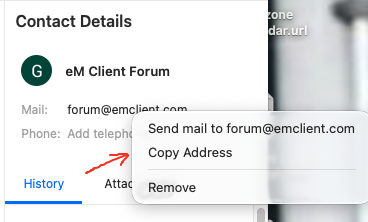
As @Gary advised previously in the thread below, you can copy the email address from the sidebar “if it’s already in your contacts”.
So If the email address is not showing in the sidebar to copy, then “you need to add the sender to your account contacts” to then be available as per the example below.
I’m definitely not going to be adding most of the people I’m emailing to my contacts, and if I do, I would need to check their email externally by copying and pasting it into a different app. I hope this very simple feature can be added. It’s a small thing, but would make a big difference.
Agreed. Also because doing this I occasionally run into a bug: in circumstances I haven’t been able to determine, the copied address looks normal, but the mail bounces back because somehow it has got a “`” (accent grave, not an apostrophe) stuck in front of the address.