I’m reposting this since the previous discussion has been marked with a solution, but no solution has been given. It’s a very simple solution to a frustrating problem.
I’ve read that pressing the home button will scroll to the top of the mail list I’m in, but on mac there is no home button. I can press fn + left to go to the top, but Ideally I wouldn’t need a keyboard shortcut. I propose clicking a second time on the highlighted mailbox would scroll to the top. This is needed quite often since after a search the UI leaves me in the position of the email that I searched for, which can be far down the list. I like that it leaves me there, but I’d like to be able to click on the mailbox to scroll to the top automatically
Thanks, there’s no page up on a macbook. I can press FN + left (a two handed shortcut) but it still requires letting go of my mouse. I don’t see any harm in adding the function of clicking on the mailbox title you’re in and having it scroll to the top.
Thanks for trying to help. Unfortunately, I don’t have a free mouse button I can assign to a keyboard shortcut. I’m suggesting a feature where a mouse click would scroll to the top of the mail list by clicking on the inbox name (eg unread, or all inbox etc.) once it’s highlighted (which currently does nothing). It’s intuitive and a simple UX improvement.
I’m suggesting a feature where a mouse click would scroll to the top of the mail list by clicking on the inbox name (eg unread, or all inbox etc.) once it’s highlighted (which currently does nothing).
Suggest then to add your comments for what you want “either to the current Sleekplan suggestion to scroll to top” above, or create your own separate Sleekplan suggestion for what you want.
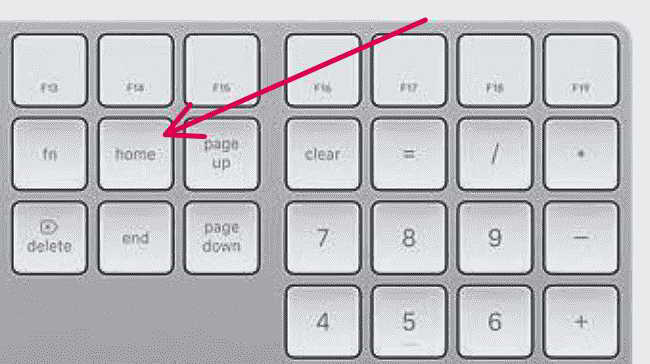
For precision: Mac extended keyboards do have a Home key (sometimes, possibly on non-EN keyboards, represented by an Up arrow with a line on top of it):
If you’re looking for ways to improve your workflow with eM Client, I’ve also found that leveraging services like https://www.yourvirtualofficelondon.co.uk/ can really help streamline admin tasks. It gave me more time to focus on crucial stuff by handling calls and managing mail efficiently. Regarding the thread, voting for feature improvements on Sleekplan is definitely a good step while using existing shortcuts for now.