How do I change my profile picture in eMClient please?
To change your Avatar in eM Client that other people see when you send emails, i recommend you setup a Global “Gravatar” which connects to your email address as in my eM Client Gravatar icon example below.
If you already have a “Domain / Fav icon” Avatar connected to your email address. eM Client can use that to.
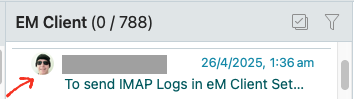
See eM Client Documenatation on Contacts
https://www.emclient.com/webdocumentation/en/10.0/emclient/default.htm#Settings/Contacts.htm
(Extract from above Contacts page)
Avatars
eM Client automatically downloads and displays avatars for your contacts from the web. We download images from Gravatar, domain icons and more.
If no image is saved for your contact on server or in your Contacts section, the contact’s initials or empty icons will be shown instead, depending on these settings:
Download avatars from external sources
This option will determine if images from external sources are downloaded or not.
This does not include images from your Contacts.
If you uncheck this option, Apply the change, and then check again, you will reset your avatars cache and new images will be downloaded. Otherwise, already downloaded images are updated once every 30 days.
Show monograms when no other avatar is found
This option determines if initials are shown. If you uncheck the option only a basic silhouette icon will show instead.
Thank you for that. Avatar now sorted!