Currently the Column for From shows the “Name” of the origin like for example “Google” but we all know its very easy to fake this. Is there away to get it to display “Google” and “[email protected]” in the from, or is there a column to show the actual email address? It would make it easier to filter out all the scammers.
You “right click” on the senders email address at the top of the body of the email, and click “add to contact” and create a contact and save, so you know who that sender is for future emails.
thats email basics 101, I know how to do that, that does not answer my question or solve my issue.
Without specifying a name in the client for the sender email address to then show in the From column, then you would need to i suspect “set a name for it at the Server End”.
What I want to see is the email in the from column unless Ive named the sender. I want it to show the actual email. not the faked “name” that the sender is using to mask. i.e. i get emails from “Google” all the time but the email is “[email protected]”
What I want to see is the email in the from column unless Ive named the sender.
By default if you don’t add the senders email address as a contact, the senders email address “will show in the From column” as in the below V10.4.5326 example.

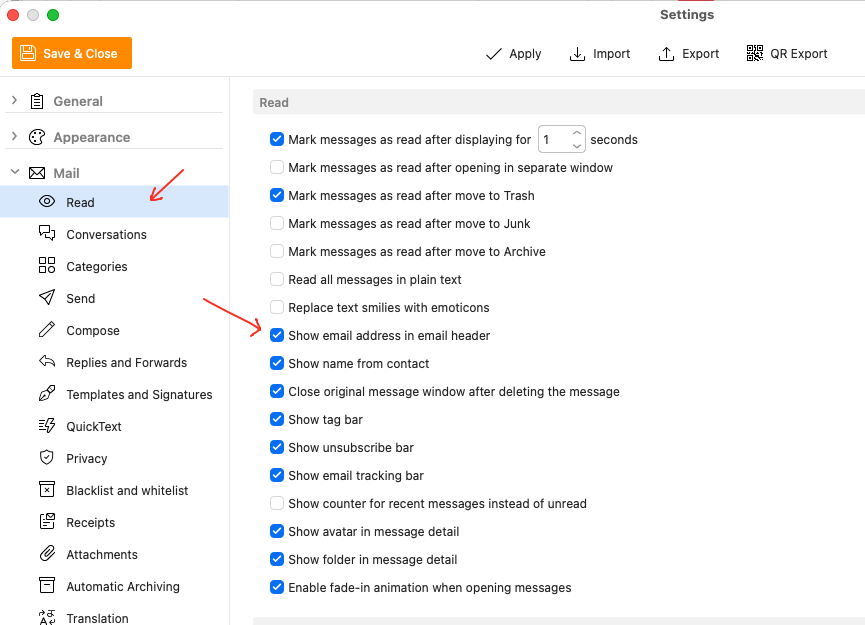
Also if you want to allways see the senders email address is the body of the email, go to “Menu / Settings / Mail / Read” and check the option “Show email address in email header”
well i havent added forum@ emailclient.com to my contact list and yet it shows cyberzork via EM Client in the from. I havnt added any amazon emails to my contacts and they show up as amazon. I havnt added the random loser whos trying to phish my microsoft account and he shows up as Adrian from Microsoft. I definately dont want to open possible phishing emails to verify they are who they say they are.