I can’t update or delete certain contacts. I’m guessing that these were (?) automatically added from received email. Not only can I not update them, I can’t delete them. The example that brought this to my attention was in “Other Contacts”; I’m not sure if this is true for all with this problem.
This was Google adding the contacts. There is an option under Account, not Contacts or GMail, to change this. Afterwards I had to manually delete all the “Other Contacts”
Other Gmail contacts are email address’s “that are usually typed in the To: line” and have never been added as a Google Contact or associated / added to an existing Contact. So they all end up in Other contacts as are unknown.
The Google Contacts Other folder is “Read Only” so you can only delete contacts online.
So as you said, you had to go online to Other contacts and delete them via going to the following Google Contacts webpage. https://contacts.google.com .
Then press the “menu on the left” & you can select Other contacts and delete any you don’t want.
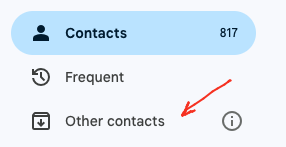
What I suggest to do with those Gmail Other contacts (if you maybe want to keep those contacts for future) rather than deleting them, is to “close eM Client” and then “go online to your Google Contacts” and drag them from “Other Contacts” to your main Google “Contacts”.
Or alternatively “on the far right of Other contacts online”, hover your mouse and click the “Save Contact” icon to add / move them to your main Google Contacts as in the example below.

Then reopen eM Client which will then sync those other contacts all in your Gmail main contacts.