I cannot send out email because it seems to suddenly require a pin
ENTER PIN for the following PGP (whatever that is) Private key…
How do I disable this I don;t recall setting anything up that would invoke this. I have even uninstalled EmClient and reinstalled and it still persists. I am about to give this damn client the flick, nothing but troubles!
I cannot send out email because it seems to suddenly require a pin
ENTER PIN for the following PGP (whatever that is) Private key…
How do I disable this I don;t recall setting anything up that would invoke this.
Could be something in your specific email itself causing that, as eM Client doesn’t normally require a pin to send mail unless you have set that up in the Mail Client previously.
So first check go to “Menu / Accounts” and click your account on the left and then “click the various tabs along the top” and see if you have any Certificates/Keys enabled there.
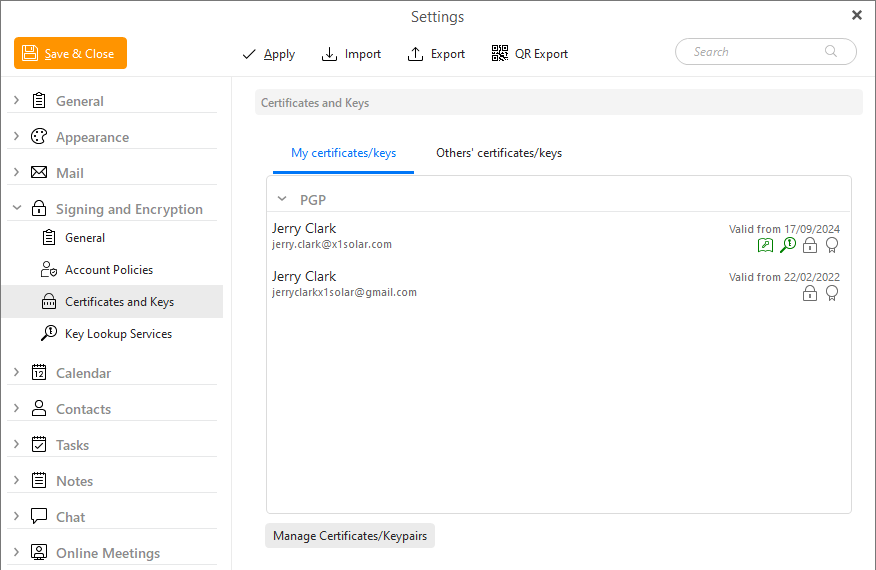
If nothing showing in Account tabs, then go to “Menu / Settings / Signing & Encryption / Certificates & Keys” and click “Manage Certificates/Keypairs” at the bottom to see if you have any certificates / keys setup or enabled. Also click the Other certificates/keys tab and check if anything in there as per the example screenshot and documentation link below.
" Certificates and Keys"