- When I use the Automatic Setup eMClient reverts to IMAP4 even using a gmail email-address
- I can’t see any Google logo if I try the manual setup (neither in Mail, Calendar or Contacts)
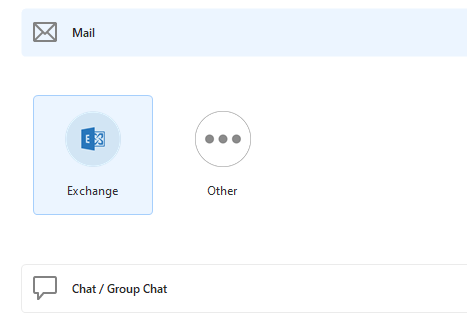
Any advice?
Using v10.4.4867 (a1d5549) on Win11
Any advice?
Using v10.4.4867 (a1d5549) on Win11
- When I use the Automatic Setup eMClient reverts to IMAP4 even using a gmail email-address
Yes the automatic wizard only sets up IMAP for Gmail accounts as per the following eM Client with Google Workspace page.
If you don’t want an IMAP account and want a POP account setup, then click the “Other” option in the manual setup and follow the prompts.
- I can’t see any Google logo if I try the manual setup (neither in Mail, Calendar or Contacts)
Sounds like eM Client may not have installed correctly or something went wrong during the install, as using eM Client V10.4.4867 and Windows 11, i can see the Gmail option as in the below example screenshot.
So suggest to try closing eM Client and then uninstall eM Client and “don’t delete the database” when asked on the uninstall wizard. Then after uninstall, if still exists delete C:\Program Files (x86)\eM Client folder.
Then go to the release history page and redownload V10.4.4867 again and reinstall and see if that gives you the Gmail option.
Good morning,
Thank you for your reply.
So I am not sure whether it was a defective component or a registry entry issue. We have eM Client since a couple of years, maybe a ver9 entry blocked the other options?
Anyway:
Thanks again!

