I am still using Windows 10 Pro. Several times now when I start the client, I get a update notice.
When I attempt to update, I receive a message that says it cannot update now and to “try again later”. Additionally, I just paid Pay Pro Global another $50 to update a second Windows 10 Pro computer to version 11 and the exact same thing is happening there. If there is some reason that both of these machines cannot be updated to version 11.0.1201.0 then how do you get rid of the constant update message both of these machines are receiving. I have attempted to follow Google’s instructions and almost lost my entire database on one machine. Where in the world is the MSIX installer? Why isn’t this a separate program?
Where in the world is the MSIX installer? Why isn’t this a separate program?
If you originally installed eM Client from the website “close eM Client” and download and install eM Client either from release history page or official download page and install and see if that installs ok.Either link has the latest MSIX app installer.
Note: Before installing make a manual backup via “Menu / Backup” incase you need to restore for any reason. You can see when the backup is complete in Show Operations via the dropdown on the right of Refresh.
Did that 3 times. Still will not update. Just tried again. When I click the link for this version, it opens the client - creates a new email with that installer as an attachment. After doing some additional digging, it appears as if this new MSIX installer was created for Windows 11. I AM NOT paying Microsoft any more money. How do I get rid of this constant reminder to update to a version that I simply cannot run?
Ok if your still getting the error “cannot update now and to “try again later”, then suggest to contact offical support via going to the VIP Support page and login in and lodge a support ticket as you have two paid versions with 12 months support.
After doing some additional digging, it appears as if this new MSIX installer was created for Windows 11
No MSIX installers can be installed on Win 10 as per Microsoft webpage information. eM Client official support will be able to sort out the problem.
When I click the link for this version, it opens the client - creates a new email with that installer as an attachment.
If you go to the release history page try “right clicking on the download file and “save to your harddisk download folder”.
Then run the app installer in your downloads with eM Client closed which should then normally open the installer wizard. Just a thought.
I went to that exact history page link. Downloaded the file. Made SURE that nothing from the client was open in the task manager. Double clicked on the newly downloaded file named:
emclient.appinstaller
eM Client opened. The splash screen was shown. Then, a brand new email was created with the newly downloaded program (or a link to it) as an attachment.
Did this now over 5 times. It just will NOT install. Now sometimes I get a prompt to update to this new version, and always it is found in the menu under “check for updates”.
I have learned more. My version of Windows 10 Pro may be missing some installer updates. I opted-out of installing these for personal reasons. Now I just want the prompts to update to this new version to disappear.
Ok you will have to wait to hear back from Official Support.
I did what I did to my Windows 10 Pro OS because I had had enough of all of the bloatware, Cortana, Microsoft Edge and such. My pc works just fine without all of the extra bologna sandwiches. I have come to realize that my actions will mean that I may NOT be able to install any further eM Client updates either. So, I need to be able to “turn-off” getting updates for this program. It’s a shame - I had just spent another $50 with Pay Pro Global to update an HP laptop to version 11 - despite the fact that I paid for the license to begin with.
You have offical eM Client support to help you. You get 12 months support. Just lodge the support ticket via the VIP Support link in the post further up and they will get back to you.
Offical support also have Team Viewer available to help you remotely if needed as well.
This is what I would prefer to do to handle this situation. I have the Pay Pro Global receipt for the version 11 upgrade that I performed on the HP laptop for the other user. I will submit it to whomever it is required to to get a refund. Then, I wish to remove version 11 from two (2) computers and NEVER get another eM Client upgrade. I do not want to be bothered with another message indicating that I have to update this software. I am not placing blame on eM Client or its staff or programmers for this situation. I want to be notified as to when this situation will be resolved by. I have posted a ticket.
There is also another option you can try if you want to till you hear back from Support.
There is a Windows download page that includes (the last) MSI installer: Download eM Client 11 for Windows | eM Client.
The MSI version doesn’t contain the app itself - it keeps your existing file associations and then installs version 11 through the .appinstaller.
So that might work for you doing it this way upgrading from V10 if you want to try that.
I did as you suggested. After I was able to successfully download that installation, I made sure that no eM Client applications were running then attempted the install. The first message that I got after was that I already had version 11 installed (not 11.0.1201.0). Then I got this:
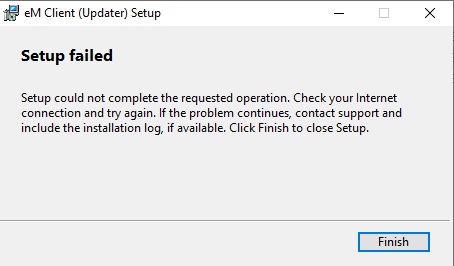
I just want the $50 back on the newest install and these two (2) computers will go back to version 10. Please inform who you must of my desire. Thanks for your wonderful help (not sarcastic)
Ok so you already appear to have V11 then that explains why the .msi installer doesn’t work as its only designed to upgrade from V10 - V11 with keeping your existing file associations etc.
As you have already lodged a ticket with offical support they will get back to you about the upgrade problems and about the refund that you want. Sorry im only a user on this forum.
Hello.
Follow the advice from @ciberzork and install the MSI version using the link provided: Download eM Client 11 for Windows | eM Client. Click on “Download eM Client 11 (MSI)” and proceed with the installation. If you encounter the error shown in your screenshot, simply try again. Installing via the MSI file will remove the previous version and any remaining traces; however, it will not delete the folder located in AppData\Roaming\eM Client. Once the installation is complete, you will be able to use the latest version.
This did not work, but I was able to fix the situation on my own