OK, this is petty. BUT, I have one unread message showing in All Mail and I can’t figure out where it is to save my life. I’ve tried selecting All Mail setting them to unread, but that doesn’t work. Any ideas?
Suggest you enable the “Unread Global folder” under Favourites to view it and see where it’s located.
If you have eM Client V10, go to “Menu / Settings (Preferences) / General / Folders” and select Favourites & Unread and then Save & Close.
eM Client Favourites V10 documentation
If you have eM Client V9, go to “Menu / Settings (Preferences) / General“ and select Favourites.
eM Client Favourites V9 documentation
Then click the Unread folder under Favourites “at the top left of the GUI” to view that email.
You can see in the latest V10 where the email is located “at the top right of the email”.
Or in V9 or V10 you can “right click” on the email and click “Properties” to see the folder location.
Note: If you already have Favourites enabled but cannot see Unread, then “right click” on the word Favourites and you can enable Unread.

Lastly apart from viewing the Unread email in Favourites, you can also use the following method to find unread mail.
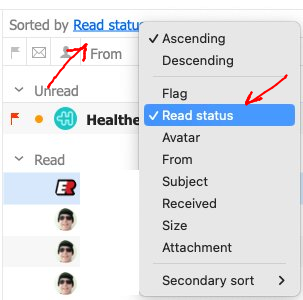
Click on the word “Received” on the right of Sorted by (above the From column), and click “Read Status” on the menu as per below example screenshot.
That will then show you all the Unread messages at the top, and then will show the Read messages below that as in the following example screenshot.
To change back, click Read Status and change back to Received.