The calendar does not display one of my two Outlook accounts.
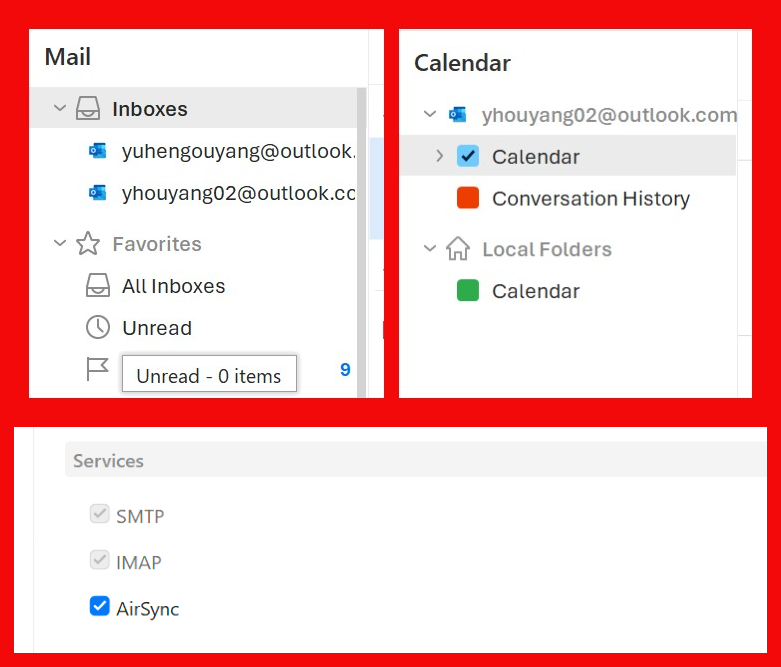
Log:
eM Client 10.4.4867+a1d55495e1 (Windows)
10:50:35 AM Online state: changed to online due to NetworkAvailability
10:50:35 AM [email protected] AirSync Synchronizing folder list
10:50:35 AM [email protected] AirSync Synchronizing folder list
10:50:35 AM [email protected] IMAP Synchronizing folder '/Inbox'
10:50:35 AM [email protected] IMAP Synchronizing folder '/Inbox'
10:50:38 AM [email protected] AirSync Synchronizing folder '/Calendar'
10:50:38 AM [email protected] AirSync Synchronizing folder '/Contacts'
10:50:39 AM [email protected] AirSync Synchronizing folder '/Tasks'
10:50:42 AM [email protected] IMAP Synchronizing folder list
10:50:43 AM [email protected] IMAP Synchronizing folder '/Sent'
10:50:45 AM [email protected] IMAP Synchronizing folder '/Archive'
10:50:46 AM [email protected] IMAP Synchronizing folder list
10:50:47 AM [email protected] IMAP Synchronizing folder '/Sent'
10:50:47 AM [email protected] IMAP Synchronizing folder '/Drafts'
10:50:47 AM [email protected] IMAP Synchronizing folder '/Junk Email'
10:50:47 AM [email protected] IMAP Synchronizing folder '/Licences'
10:50:48 AM [email protected] IMAP Synchronizing folder '/Notes'
10:50:48 AM [email protected] IMAP Synchronizing folder '/Outbox'
10:50:49 AM [email protected] IMAP Synchronizing folder '/Scheduled'
10:50:49 AM [email protected] IMAP Synchronizing folder '/Sync Issues'
10:50:49 AM [email protected] IMAP Synchronizing folder '/Trash'
10:50:49 AM [email protected] IMAP Synchronizing folder '/2018 MIT'
10:50:51 AM [email protected] IMAP Synchronizing folder '/2019 CMU'
10:50:52 AM [email protected] IMAP Synchronizing folder '/2020 Applications'
10:50:53 AM [email protected] IMAP Synchronizing folder '/Archive'
10:50:53 AM [email protected] IMAP Synchronizing folder '/Drafts'
10:50:53 AM [email protected] IMAP Synchronizing folder '/Sync Issues/Conflicts'
10:50:53 AM [email protected] IMAP Synchronizing folder '/Itineraries'
10:50:54 AM [email protected] IMAP Synchronizing folder '/Sync Issues/Local Failures'
10:50:54 AM [email protected] IMAP Synchronizing folder '/Junk Email'
10:50:54 AM [email protected] IMAP Synchronizing folder '/Sync Issues/Server Failures'
10:50:54 AM [email protected] IMAP Synchronizing folder '/Notes'
10:50:54 AM [email protected] IMAP Synchronizing folder '/Outbox'
10:50:54 AM [email protected] IMAP Synchronizing folder '/Rents'
10:50:55 AM [email protected] IMAP Synchronizing folder '/Sync Issues'
10:50:55 AM [email protected] IMAP Synchronizing folder '/Trash'
10:50:56 AM [email protected] IMAP Synchronizing folder '/Itineraries/Flights'
10:50:57 AM [email protected] IMAP Synchronizing folder '/Itineraries/Hotels'
10:50:57 AM [email protected] IMAP Synchronizing folder '/Sync Issues/Conflicts'
10:50:57 AM [email protected] IMAP Synchronizing folder '/Sync Issues/Local Failures'
10:50:58 AM [email protected] IMAP Synchronizing folder '/Sync Issues/Server Failures'
10:51:17 AM [email protected] AirSync Synchronizing folder '/Calendar/Yuheng Ouyang'
10:51:23 AM [email protected] IMAP Synchronizing folder '/Sent'
10:55:29 AM [email protected] IMAP Synchronizing folder '/Sync Issues'
10:55:31 AM [email protected] IMAP Synchronizing folder '/Sync Issues/Server Failures'
10:55:37 AM [email protected] IMAP Synchronizing folder '/Itineraries/Hotels'
10:55:38 AM [email protected] IMAP Synchronizing folder '/Itineraries/Flights'
10:55:38 AM [email protected] IMAP Synchronizing folder '/Sync Issues/Local Failures'
10:55:39 AM [email protected] IMAP Synchronizing folder '/Sync Issues/Server Failures'
10:55:39 AM [email protected] IMAP Synchronizing folder '/Sync Issues/Conflicts'
10:55:39 AM [email protected] IMAP Synchronizing folder '/2020 Applications'
10:55:40 AM [email protected] IMAP Synchronizing folder '/2019 CMU'
10:55:40 AM [email protected] IMAP Synchronizing folder '/2018 MIT'
10:55:41 AM [email protected] IMAP Synchronizing folder '/Archive'
10:55:41 AM [email protected] IMAP Synchronizing folder '/Junk Email'
10:55:42 AM [email protected] IMAP Synchronizing folder '/Drafts'
Explored:
- Both accounts are Outlook, so this is weird.
- The account is not hidden or folded in the calendar tab. It is simply not there.
- No error in the log.
- From the log: the successful account has AirSynced the folder list, Calendar, Contacts, and Tasks folders, while the failed account’s AirSync stops after syncing the folder list. Therefore, no calendar folder or tasks are downloaded.
- Repairing the account does not fix the issue.
- The folder is missing entirely, so it is not able to repair the calendar.
- Re-authorizing the failed account multiple times does not fix this issue.
- Fully uninstalled eM Client (with AppData and cache removed) and tried both the latest version and the rollback does not fix the issue.
Also, I noticed that through Microsoft’s guide, Outlook accounts should use IMAP server outlook.office365.com, but your current auto-setup for Outlook fills imap-mail.outlook.com as the server. This caused a lot of sync errors and “Bad Command” errors. After manually switching to the new server, this has been fixed on the mail side.
I would like to urge you to place more attention on the user experience. Although I can only speak for Outlook on your Windows app, it consistently shows instability and errors throughout my use. I am a Pro user and have been using eM Client for a long time. This is the most user-friendly (especially the convenience to add and edit calendar items and the Agenda view), so please do continue to make it usable.