I have noticed this issue a few times, but it doesn’t happen always…
I have a Google account synced to eM Client, which mostly works just fine. It syncs everything as expected.
When I get an invite to some meeting it shows up in my calendar as neither accepted, nor declined and I get the corresponding invite in my inbox.
When I delete the invite without accepting or declining the meeting, the meeting just disappears from my calendar entirely. It doesn’t get declined, it doesn’t stay there with an unknown status, it’s just gone entirely.
This seems to happen mostly when the meeting was updated before I accepted or declined it and then I remove the updated invite - though I am not 100% certain.
Point is that this behaviour wasn’t always there. This used to work by just leaving the invite in my calendar as neither accepted, nor declined.
How can I change this behaviour? I often delete invites from my inbox and only decide to accept or decline meetings later via the calendar. Right now I’m routinely missing meetings; they just disappear. This is not workable.
Update on this; I just got an invite where I clicked the Tentative button in eM Client and it also disappeared from my calendar… something is not working properly here.
When I get an invite to some meeting it shows up in my calendar as neither accepted, nor declined and I get the corresponding invite in my inbox.
Using eM Client 10.4.4867 on Windows.
That’s very strange.
Could be something has changed in your online Google account Calendar settings “for accepting Invitations”.
Go to Google Calendar online via a browser and then go to Settings (gear icon) → Event settings → Add invitations to my calendar and see what option you have enabled.
If no option makes any difference then “when you get another invitation”, go online to Google Calendar and “see if the same thing happens there”. If it does contact Google tech support.
However “if this issue doesn’t happen online with Invites”, then suggest in eM Client if you use Gmail as IMAP, go to “Menu / Accounts” and remove and readd your Google account via the automatic account wizard and see if a new account fixes it.
Note: If you do try removing and readding your Gmail account, make a backup first via “Menu / Backup” incase you need to restore for any reason. You can see when the backup is complete in Show Operations via the dropdown on the right of Refresh.
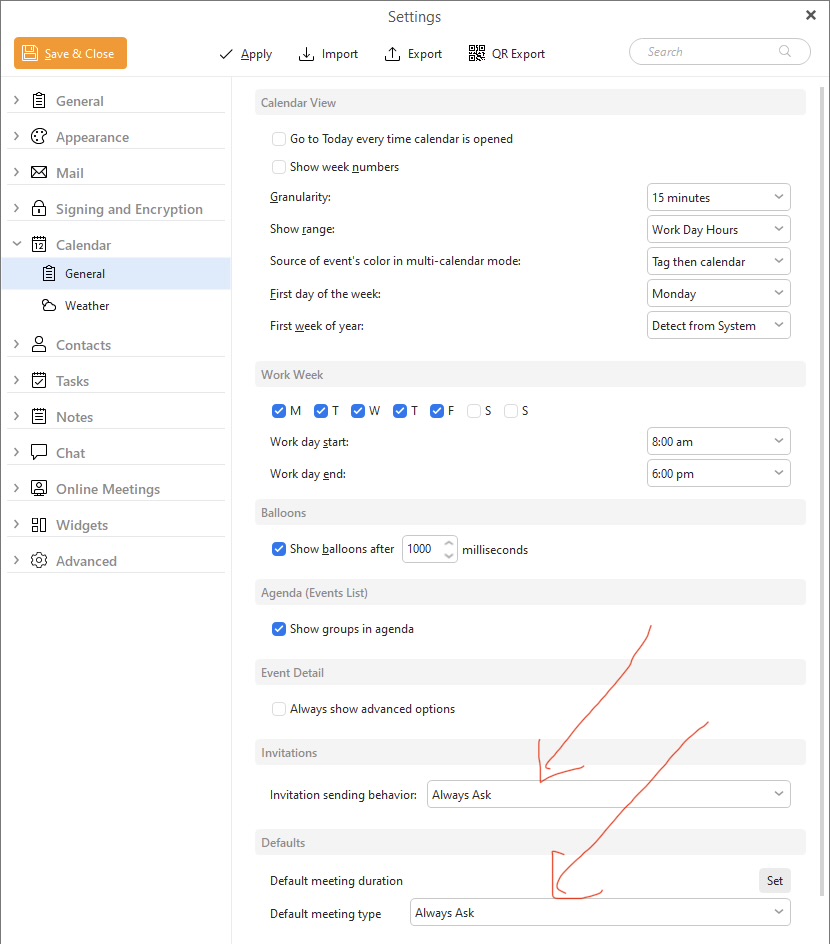
Also check in eM Client “Menu / Settings / Calendar / General” at the bottom that you have set the Default Meeting type and Invitations sent to “Allways Ask” for both options as per the screenshot below incase that’s changed.
Thank you for the detailed breakdown.
I checked and all my settings are the defaults.
I should elaborate on my situation a bit, since it’s clear that I did not give all information - that is my bad.
In my standard setup, I have eM Client open on my main screen for reading emails etc. On my other screen I have a browser window open pointing to Google Calendar for an overview of my day. So I generally have both open at the same time.
If I delete an invite email in eM Client without accepting or declining the invite, the invitation instantly disappeares from the Google Calendar in my browser window.
If I select tentative, the same happens - invite is just gone from Google entirely. Not there as declined or accepted - just gone. This happens near instantly.
I generally shift-delete emails to bypass the trash, but even if I just normally delete them this seems to happen… but, as I said; for some bizarre reason not always. It mostly seems to happen with follow-up invites if someone else changes the original invitation, but even that is hard to pin down.
I will find an opportune time to re-link the Google account and see if this behaviour persists, though it’s difficult to consistently reproduce.
Testing both those scenarios with the same eM Client for Windows V10.4.4867 & Windows 11, and my own Google account, the event “stays in eM Client Calendar” and “also stays in Google Calendar online” with my “Google Calendar online Invitation setting set to receive from everyone”.
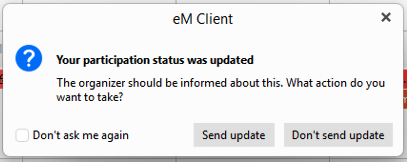
The only time the event disappears from eM Client calendar and Google calendar online (unless the organiser of the event cancels the event) is “if i manually delete the event in the eM Client calendar” where i then get a popup message as per below if i want to notify the sender or not.
I’ve had some more time to play around with this and it gets weirder… I have not yet relinked the account, but I have been testing some potential edge cases. Here is what I noticed;
Most of the time, it works fine. I delete the email, nothing happens.
This happens specifically and only - as far as I could test - if the invite is for a recurring event of which one single instance has changed. If I delete the update notification of that, the entire recurring event vanishes from my calendar.
I realize this is a very weird edge case, but that’s what I’ve found out so far.