I received one of those typically enthusiastic emails informing me that em Client for iOS can now also manage calendars and contacts. I hadn’t actually noticed that before (it’s quite well hidden). Unfortunately, I can’t figure out how to set it up so that my calendar and contacts are also displayed, and in all the excitement about this great new feature, this was probably forgotten in the email. Can anyone help me with this?
Go to your account settings and check if you can enable calendar/contact setting. Maybe you have to add a new account, where you can chose calendar account providers like Google, Yahoo, iCloud, Fruux and CalDAV.
I received one of those typically enthusiastic emails informing me that eM Client for iOS can now also manage calendars and contacts. I hadn’t actually noticed that before (it’s quite well hidden). Unfortunately, I can’t figure out how to set it up so that my calendar and contacts are also displayed
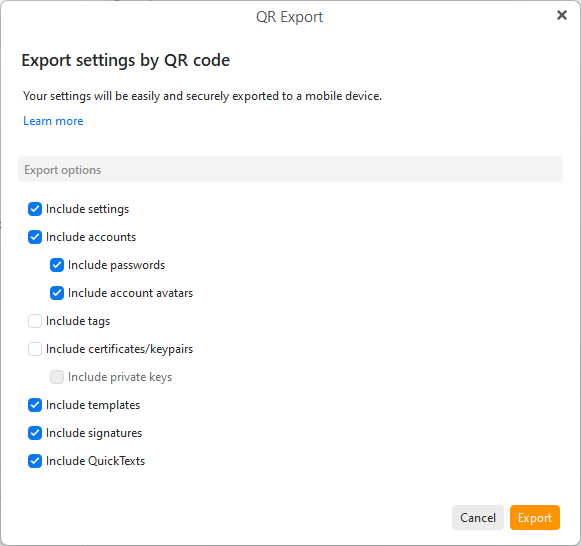
To setup the same Mail, Contacts, Calendar, Tasks for the mobile app is to “use the QR Export code option” on eM Client desktop.
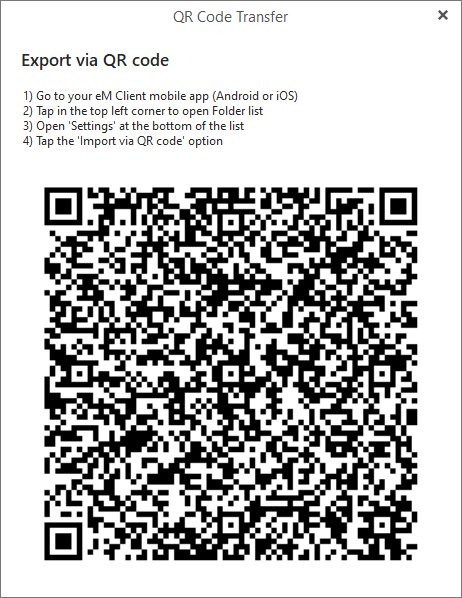
To export via QR Code on the desktop, go to “Menu / Tools / QR Export” and select / check all the options, and click “Export”.
Then when you see the QR code appear, open the eM Client mobile app and press "Menu / Settings / Import/Export and press Import via QR Code as per the eM Client online documentation link.