I have no idea if these problems have been addressed before, a search in the forum was unsuccessful.
Problem 1: Year not specified in Google
- You don’t have to specify a year when you manage your contacts birthdays in a Google contacts list. A day and a month suffice as the year is optional. However, the year is mandatory if you want to specify a birthday date in eM Client. This is frustrating, particularly for business contacts where the year is totally irrelevant. Anyways.
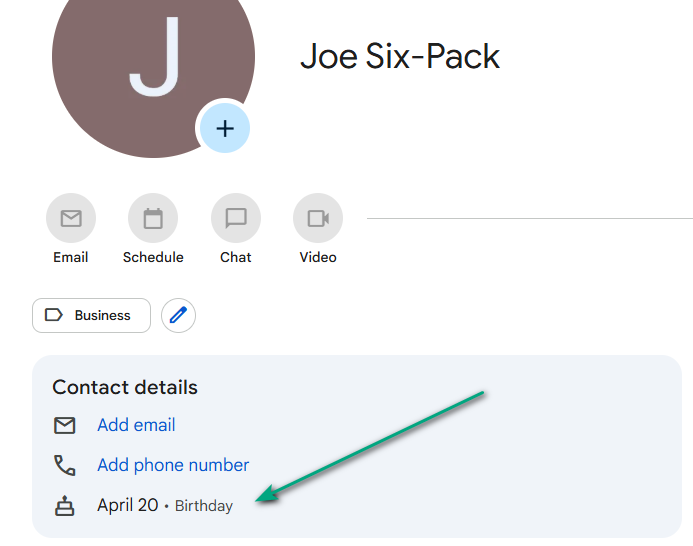
- Not specifying a year in Google causes eM Client to display weird and different dates depending on the view you’re in in the Contacts section. Here’s an example:
A birthday date is added for a contact in Google: April 20
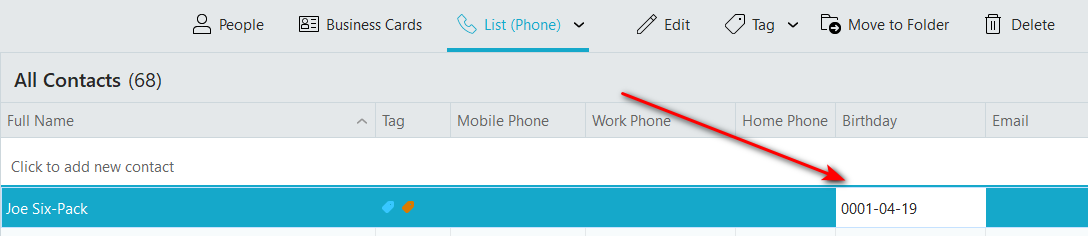
In List (Phone) view: Joe’s birthday date is April 19 of year 0001 (changes to April 20, 0001 when I close eM Client and reopen it again)
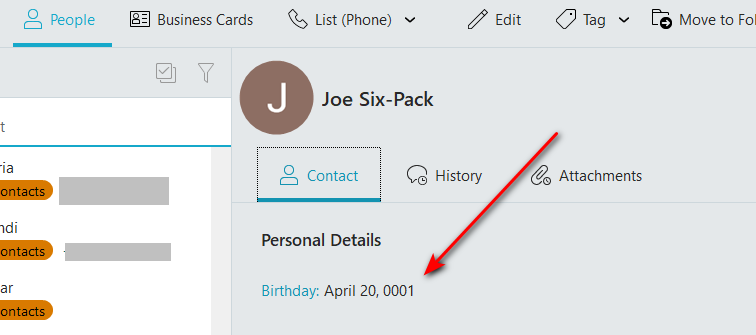
In People’s view Joe is 1 day younger than in the Listing view: April, 20 of year 0001
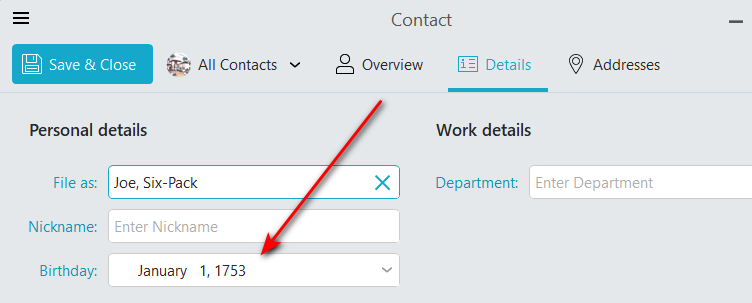
Finally, if you want to edit Joe’s significant date, you’ll notice that he did some impressive time travel: January 1st, 1753 (error consistent over time)
- Repairing the whole database or repairing a single contact doesn’t fix the problem.
Problem 2: Even with a year specified in Google
Even if you specify a year in Google, eM Client shows the added contact(s) to be one (1) day younger in the List (Phone) view (but the right birthday date in all other views). The info becomes accurate in the List (Phone) view once you close all instances of eM Client and open it again.