Running trial mode on Win 11, ran into the delete current event when adding tag color to current and recurring events. This was reported November 2025, with workaround to repair. Is it typical for this kind of obvious bug to not be fixed by now, 9 months later?
Thanks, trying to decide whether to use/buy EMClient as my default email client.
I sent a couple of pictures into Julie Wren. I’m getting variable results, I’ll try to describe fully.
I had just installed EMClient, calendar linked via caldev to my iCloud account. All items from iCloud came through ok. I selected one of the recurring items with this item and recurring checked, added a tag to the item, did save/close. The today item disappeared, but all the future instances were properly tagged. After a calendar repair the today item reappeared, with the proper tag color.
On a different day, I again selected the recurring item same mode, changed the tag, and then did save/close. This time the item did not disappear, but the tag color did not change. The tag color did change properly on all the future items. After repair the today item still had not taken on the new tag color.
I did read in the forum about some problems with modifying recurring calendar items, with problems similar to mine, but not identical. Not sure best way to proceed.
The bug is definitely still there, by the numbers:
Set up EMClient on my wife’s W11 system, went ahead and finalized licensing (free version).
iCloud calendar and contacts full imported, showed up in apple default color/tag
Created several new tags, no problems
Applied tags to various recurring events. About 1 out of 4 or so, when Save and Close, the current event would disappear from the calendar screen, all future instances were still there, with correct tag.
Calendar repair, invoked from the calendar properties, caused the current event to reappear with correct tag, all future instances still ok.
The bug is definitely still there. Unfortunately one has to do several operations before it occurs, could not correlate its happening with any other part of the process, i.e. it’s random. Luckily there is a workaround, although invoking repair is bothersome, I assume it completely rebuilds the calendar structure from iCloud?
Hi Richard, we have tested the behavior based on the steps you provided, but we were unable to reproduce the issue. During our testing, all events remained visible and the tag colors were applied correctly.
Unfortunately, without being able to reproduce the issue, it is very difficult for our developers to identify the cause and implement a fix.
Michal, I tried, 10 or so with screen recording enabled, did not occur. I’ve seen it on two different systems, on different accounts, both tied to Apple with Caldev and Carddev. And of course it is intermittent.
There isn’t much to see that can’t me described - I open the recurring calendar event, click on this and future, change the tag, and then do Save/Close. The one used to change the recurring event disappears, leaving no trace. Future instances are changed properly. Calendar repair brings back the instance that disappeared.
I’ll try again to recreate.
Richard
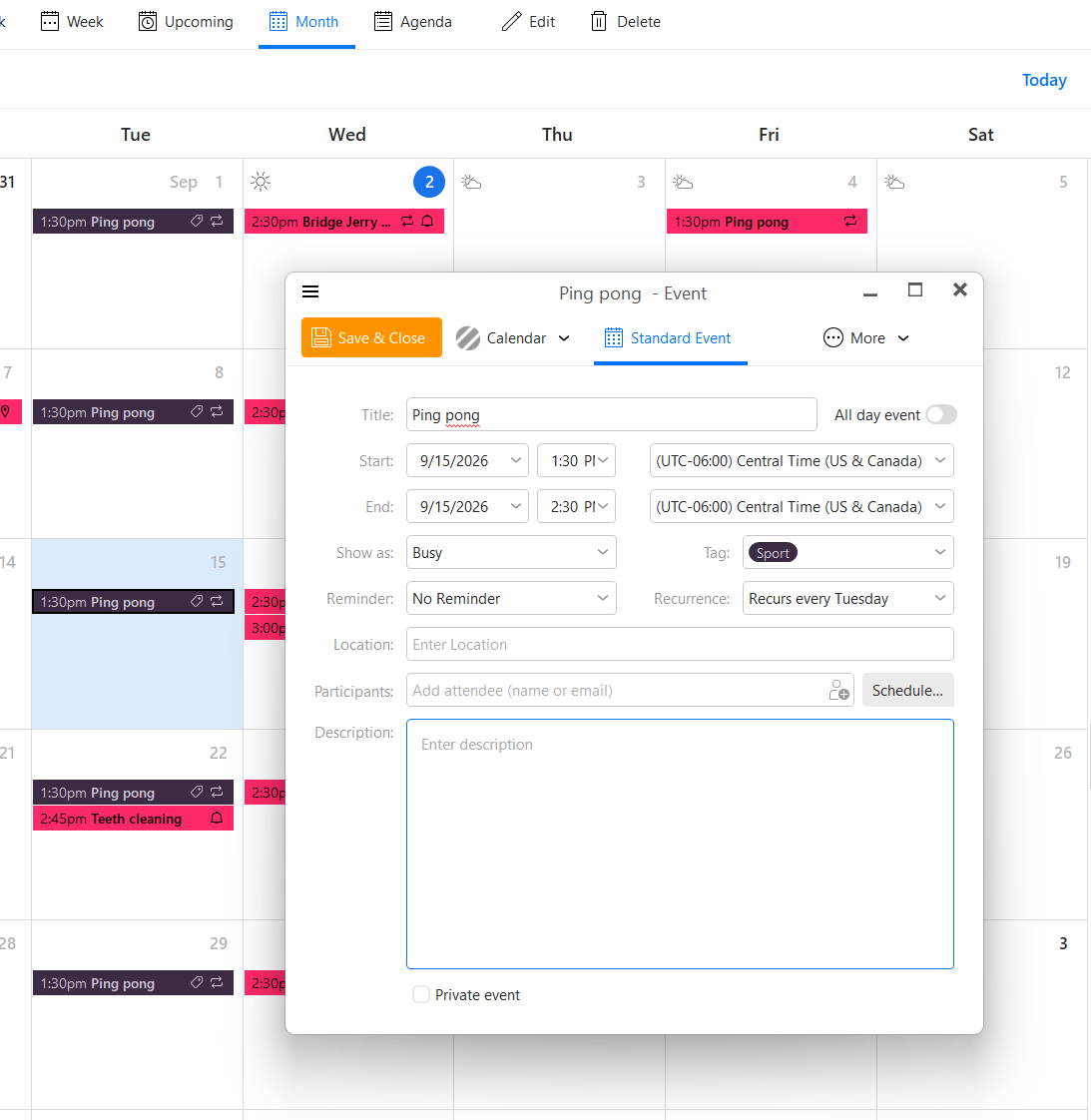
Version 10.4.5674. Referring to attached image, if I change to a new tag (or go from no tag to a new tag), then click save/close, occasionally the selected instance will disappear completely. Future instances will be correctly modified, and after calendar repair the selected instance will reappear with the correct new tag.
No tags from another app, calendar and contacts both sync’d with apple iCloud, which has no tagging. So recurring events went from no tag to one of the EMClient tags applied.
No tags from another app, calendar and contacts both sync’d with apple iCloud, which has no tagging. So recurring events went from no tag to one of the EMClient tags applied.
Ok ill test that out with my iCloud account with that same version later today
The issue from what i can tell is when the recurring events have “first been created in the iCloud calendar end and then synced to eM Client”.
After the recurring events sync to eM Client, “the day changes to a few days earlier” eg: Thursday becomes Monday (even though the date stays the same in the event) when reopened.
When you save and close the event after eg: changing the time (not the date), this causes “the first event to disappear” and all the future recurring weekly events go back a few days.
If the recurring events “are created in eM Client” with the same iCloud calendar event its correct and this does not happen. So its only when synching events created first online in iCloud.
Good catch, I believe all my instances were first tag after iCloud sync, i.e. just after installation of EMClient. I created a couple of dummy events from my iPhone, went into EMClient calendar and tagged. Not able to reproduce bug. Unfortunately it’s intermittent, doesn’t happen every time, glad you were able to capture.
This issue seems fixed now in the V11 Beta. I don’t know if there will be a new V10 fix for this.
So if you happy to test V11 Beta which is free to use till released, then go the the following url and the download / upgrade link is at the bottom for Pc or Mac.
Note:- If you do try V11 Beta, make a manual backup first via “Menu / Backup” incase you need or want to restore back to V10. You can see when the backup is complete in Show Operations via the dropdown on the right of Refresh. Also “close eM Client” before updating.
Installed V11 over my V10, worked ok, but when I try to use Microsoft Outlook Classic I get multiple error messages from emclient, 3 or 4, before Outlook will function. I think this is known bug, but not fixed in most recent V11 version.
Installed V11 over my V10, worked ok, but when I try to use Microsoft Outlook Classic I get multiple error messages from emclient, 3 or 4, before Outlook will function. I think this is known bug, but not fixed in most recent V11 version.
Suggest you then email the Beta team for that issue @ [email protected]