Bug in 10.4

Created annual repeat event (all-day) for 9th October 2026 and selected repeat of 2nd Friday in October, but the event has incorrectly been created and repeated on 2nd Monday - note the correct dates being shown in the example list …

If I change this event to a non all-day, the entry changes and I can then revert and the date is correct. It also appears to be correct when creating any subsequent events, so would appear to be restricted to the first creation after the application is started.
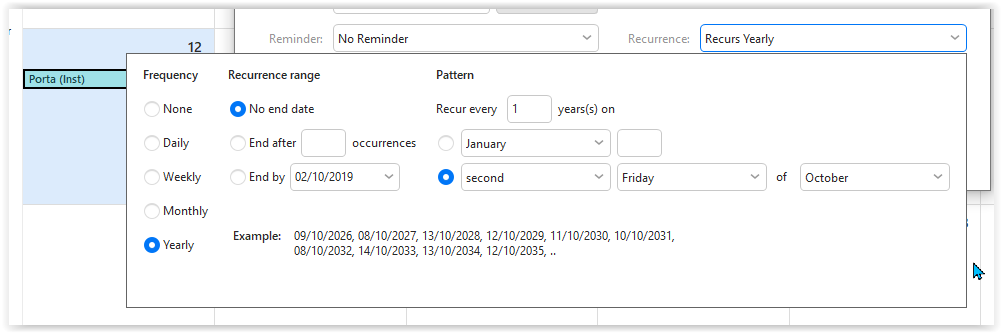
It used to work correctly!

Version:10.4.4195 (7d32f97)

Edition Windows 10 Pro
Version 22H2
Installed on ‎28/‎05/‎2020
OS Build 19045.6691

sábado 13 diciembre 2025 :: 1749hrs (UTC +0100)

Hey @Richard_George1

I have Win 11 Pro 25H2 & eMC 10.4.4209 (paid)

I have just checked your event setup exactly as you
have detailed on 2 separate computers up to 2036
I had no errors so sorry I can not help you.

skybat

¡Buena suerte!

¡Saludos desde Sevilla la soleada en España!
¡Mis mejores deseos y mantente a salvo!

[email protected]

Hablo español, luego portugués, inglés, francés y alemán
con conocimiento de varios otros idiomas.

Let’s create a test event and gather logs:

  1. Go to menu > Settings > Advanced.

  2. Enable logging for CalDAV / Google Calendar / AirSync / Exchange Web Services (depends on your account).

  3. Click the “Clear Logs” button.

  4. Restart eM Client.

  5. Go back to > Advanced.

  6. Click the “Send Logs” button.

  7. A new email window will open. Add [email protected] and [email protected] as the recipient, link this thread, and send it.

Also: right-click the affected event, click Save As, and include the file in the email. Thanks!