I activated a subscribed calendar in the main calendar view to check on a co-worker’s availability and that calendar’s events also showed up in my sidebar view. Fine, I would expect this. When I was done with that, I unchecked said calendar to hide it again, but the events stayed in the sidebar view (they hid from the main view, as expected). I have restarted eM, restarted my machine, and removed and re-added the associated Google account but I still have blocks of events in my sidebar that will not go away from this one single calendar.
The sidebar has its own separate folder selection, it does not match the main calendar setting. This is intentional so that you have all the daily events you need always in the sidebar, even if you quickly check other calendars in the main view.
Make sure to hover next to the Calendar title in the sidebar so the Gear icon shows up, then click it and select “Choose folders” - and set which calendars should always be visible in the sidebar.
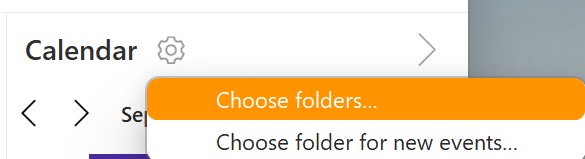
Got it, did not see that gear until I hovered over that spot, and the separate folder selection does seem to work… after some back and forth between the main calendar view and the sidebar view. It appears the bug isn’t as defined as I had first assumed. When I first launched eM, I set up my calendars and both the main view and sidebar view mirrored each other. When I went to add my co-workers calendar to check for availability the sidebar view updated with that calendar also, which is the original “bug” that I was reporting. However, when I went to manage the folders for the sidebar view and unchecked a bunch of folders, they also disappeared from the main calendar view, and it took several back and forth efforts to get each view to display the correct folders.