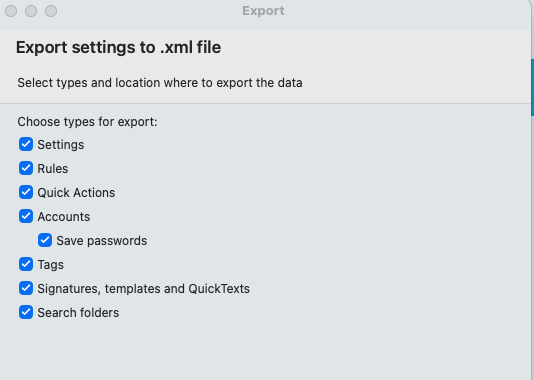
What’s included in the “Settings” IMPORT backup option?
The other day eM Client was misbehaving.After it “repaired” itself I restored my “Settings” from backup (import) .xml file but my theme wasn’t backed up. I wonder what else it failed to backup?
What’s included in the “Settings” IMPORT backup option?
The other day eM Client was misbehaving.After it “repaired” itself I restored my “Settings” from backup (import) .xml file but my theme wasn’t backed up. I wonder what else it failed to backup?
The other day eM Client was misbehaving.After it “repaired” itself I restored my “Settings” from backup (import) .xml file but my theme wasn’t backed up. I wonder what else it failed to backup?
The export to .xml saves the following settings which i presume also includes the theme in Settings, but as it didn’t include your theme when you reimported it eg: (may not yet be programmed to do that when exporting), so you will need to instead use the builtin backup and restore either manually via “Menu / Backup” or automatically via the “Menu / Settings (Preferences) / General / Backup” which definitely includes the Theme.
Note:- If the export to .xml Settings is meant to also include the theme, then someone will update this thread.