I have read the instruction how to create an avatar with gravatar. I did so. But when I send an mail to my self that avatar is not shown. Instead of that the picture/avatar is shown from my Apple account (Applle Settings).
I have also followed the instructions to update em for using the latest gravatar…
Still no succeeded in showing my avatar in mails, need help. What am I doing wrong?
If I receive a mail form EmClient as I did after you placed a reaction, the logo of EmClient is placed in list of recieved mails and in the mail itself. That is what I want: my logo in mail send by me and received by others. I have made a Gravatar avatar but when I send a mail to myself to see what happens, the mail I send to myself has not that avatar but avatar/picture from my Apple account.
You can force eM Client to redownload new images from Gravatar.com or from Domains etc by clearing the local avatar cache.
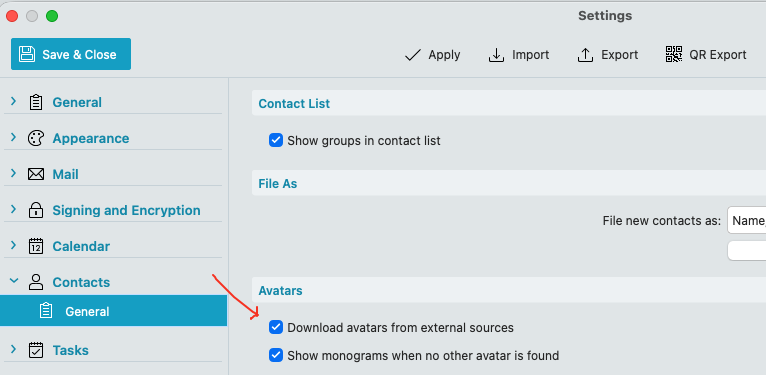
Go to "Menu / Settings (Preferences) / Contacts / General / Avatars” and “disable the box marked Download Avatars from external sources”.
Then “Apply and Save Settings” and "close and reopen eM Client.
Then “re-enable that checkbox” and Apply and Save Settings. My own remote Gravatar did then update / change in approx 48hrs after i changed it at Gravatar.
See eM Client webpage support for full information on changing your own Avatar.
I have done that and all avatars disappear and change to initials except from a mail I send to myself: that avatar is the avatar from my Apple account. So, what you discribe works only with contacts but I sometimes send mails to myself (from mailaddress A to mailaddres B) but I am not ‘a contact’ so that avatar is not loaded from gravatar.com.