Others have complained about this, but you don’t fix it. Every other email program does this. When I refresh, I expect new email to be visible, not hidden.
1 Like
New mail “is normally allways visible at the top” unless you are eg: too far down the message list so won’t see it. If you are too far down and cannot see the top of the Inbox, then when then new mail notification appears, you can press the “Home” key on a 101 Pc or Mac keyboard, or if you have no home key like on a Mac laptop then press the “FN + left” key to go to top.
Now If you can see the top of the Inbox “and are not seeing new unread messages arrive”, then if you have the latest V10 you might have eg: Categories enabled where by default “unless you disable that” new read mail gets sorted into different category Inboxes like Primary, Other, Promotions, Social, Updates etc depending on the type of account.
See the below link on Inbox Categories that might explain why you don’t see new mail at the top of the Inbox.
Apart from the above, if you don’t have Categories enabled and can see the top of your Inbox ok, then sometimes eg: optionally installed Firewall / Security programs, or optional installed Antivirus programs or VPNs can sometimes interfere with mail clients.
So if you have anything like that installed “other than the default OS stuff”, then try completely disabling those programs to test in case of any interference blocking new mail.
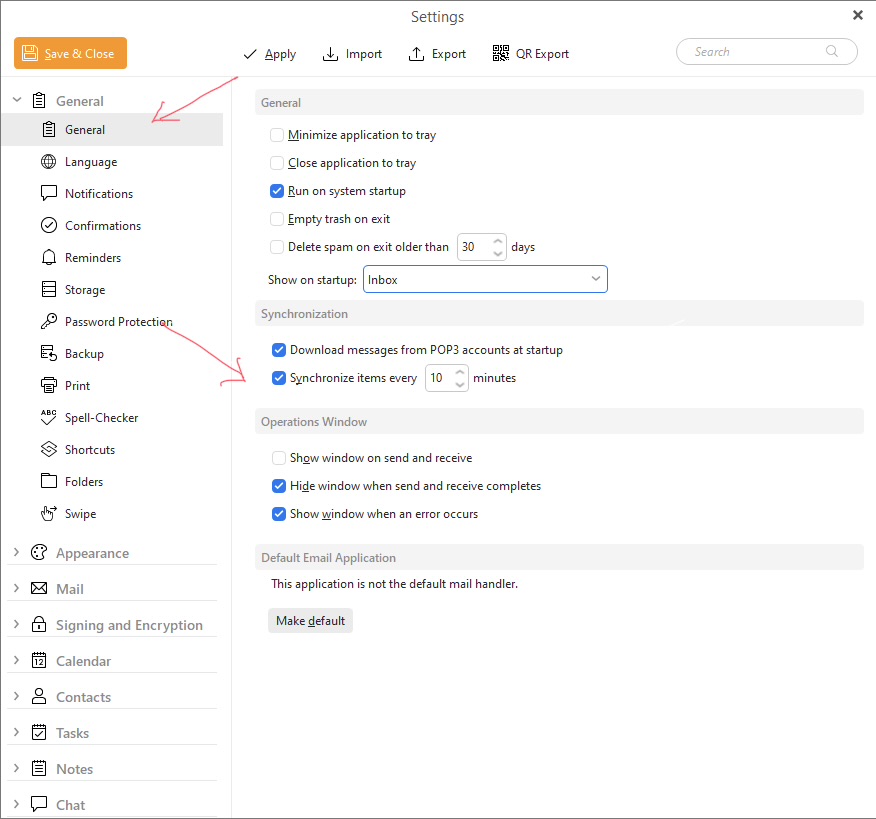
Lastly check via “Menu / Settings / General” how many seconds you have set for sending and receiving as per example screenshot below “to set when the client automatically check for new mail” and syncs new mail to folders apart from when it initially checks after opening the program.