I have conected to my pc a network disk where I lodge my files but when I try to attach a file to an email from this location it gives me error and didn`t appear in the window to select the file. I have v. 11 beta
when I try to attach a file to an email from this location it gives me error
Whats the error message you get when you try and attach the file from your network drive ?
it doesn´t recognize my network. Mapped network drives do not appear when attaching a file
In eM Client 11 Beta, mapped network drives do not appear in the file picker when attaching files.
My network drive is mapped as Y: to \\192.168.xx.xxx\despacho.
Y: does not work, but entering \\192.168.xx.xxx\despacho directly works correctly.
It seems to be an issue with mapped network drives in the MSIX version.
In eM Client 11 Beta, mapped network drives do not appear in the file picker when attaching files.
My network drive is mapped as
Y:to\\192.168.xx.xxx\despacho.
Y:does not work, but entering\\192.168.xx.xxx\despachodirectly works correctly.
Ok that is strange.
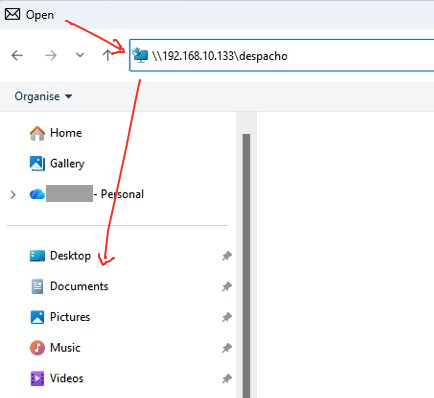
Have you tried eg: Pasting your shared drive address \192.168.xx.xxx\despacho "in the top of the attach window and then “press enter” to open the shared drive in the attach window.
Then try “dragging the network icon” on the left of the address down as a quick link" in your user profile folders area ? If that works just use that quick link permanently when you attach files.
Thanks. I’ll try that as a temporary workaround.
However, with the previous version I could access the mapped Y: drive directly from the attachment window without any issues, so I think it would be worth identifying the root cause of why mapped network drives are no longer being displayed in the current version.
The workaround may be useful for now, but ideally the normal access to Y: should work as it did before.
I would then suggest you email [email protected] to advise.
There is also a new updated V11.0.282 you can try via the release history page.
I got where was the problem. In eM Client 11 beta, mapped network drives work correctly when eM Client is launched from the Windows Start menu. However, if I pin eM Client to MyDockFinder and later launch it from the dock, mapped drives such as Y: are no longer accessible and drag-and-drop from those drives also stops working.
The UNC path by IP still works, so the network share itself is fine.
I found that MyDockFinder launches eM Client directly from the MSIX executable in C:\Program Files\WindowsApps\..., while launching it through its MSIX AppUserModelID works correctly.
As a workaround, I created a small launcher using:
explorer.exe "shell:AppsFolder\eMClient.20054CA46072C_veq4nz3ze5v72!App"
and pinned a shortcut to that launcher in MyDockFinder. This preserves access to mapped network drives. So now it works properly. Thanks
Issue: MyDockFinder + eM Client 11 MSIX – mapped network drives vs. window grouping
I am using eM Client 11.0.282.0 installed as an MSIX package.
I found the following behavior with MyDockFinder:
- If I launch eM Client from the Windows Start menu, mapped network drives such as
Y:work correctly, including drag-and-drop of attachments. - If I use “Keep in Dock” in MyDockFinder, it stores and launches the executable directly from:
C:\Program Files\WindowsApps\eMClient.20054CA46072C_11.0.282.0_x64__veq4nz3ze5v72\MailClient.exe - When eM Client is launched this way from MyDockFinder, mapped drives such as
Y:are no longer accessible, although the same network share still works via UNC/IP path, e.g.\\192.168.xx.xxx\xxx. - Launching eM Client correctly through its MSIX AppUserModelID works:
explorer.exe "shell:AppsFolder\eMClient.20054CA46072C_veq4nz3ze5v72!App" - However, when using a custom launcher (
.vbs,.lnk, or.exe) to start eM Client through the AUMID, MyDockFinder shows a second icon for the actual eM Client windows. The launcher icon and the running application are not grouped together. - The secondary icon correctly groups and previews all eM Client windows, but if I hide that icon, window grouping and previews are lost.
So the issue seems to be that MyDockFinder handles the persistent launcher and the running MSIX application as two different applications. If it keeps the real eM Client process in the Dock, it launches MailClient.exe directly and mapped network drives stop working. If eM Client is launched correctly through its AUMID, window grouping is lost because a second icon is created.
It would be useful if MyDockFinder could launch MSIX applications through their AppUserModelID and still associate/group the running windows with the same persistent Dock icon.
eM Client AUMID:
eMClient.20054CA46072C_veq4nz3ze5v72!App