When I create an appointment in my calendar that is due to take place in a different time zone, it appears in my calendar with incorrect times – specifically, the times that apply in the time zone I’m currently in, rather than the times that will apply where the appointment is actually taking place. That strikes me as rather absurd, but I suppose that’s just the way it is. The question is, how can I get round this, i.e. prevent my calendar from showing me a completely ridiculous time for an appointment, which I then have to laboriously convert to work out when the appointment is actually taking place. (Of course, I can select the time zone I’m in when I create the appointment, but then it’s wrong again when I’m somewhere else. It seems to me that this is a significant step backwards compared to the good old cardboard and paper diary. But I don’t really mind that either, provided I can get round the problem without resorting to that option. Is that possible with the client?
When I create an appointment in my calendar that is due to take place in a different time zone, it appears in my calendar with incorrect times.
I don’t know how to fix your current issue, but Multiple time zones “is planned for eM Client 11”as per @Michal_Burger post below which then once implemented should “I presume also fix that issue” for setting an event time in a different time zone.
If that’s not correct someone will update this thread.
You might want to add your comments to the Multiple Time zone Sleekplan for adding events.
I think this is a misunderstanding. I’m not at all concerned about being able to set different time zones. Rather, I would appreciate it if the client’s calendar would simply display what I have entered. So if I enter that I have an appointment at 10:00 am on a certain day, I want the calendar to show that this appointment is at 10:00 am, and not some other time that I then have to convert myself. The simplest solution would be an entry that is independent of the time zone. BusyCal, for example, can do this without any problems.
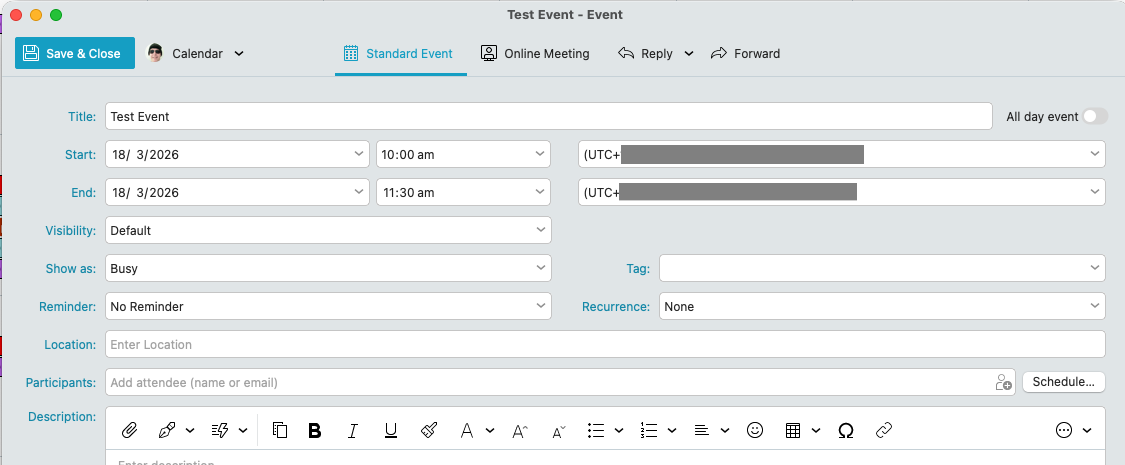
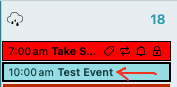
If you create an event at 10am on the eg: 18th March “and you have your correct local country timezone on the right of the start and end time”, then when you save & close the event, you will normally see exactly the same event time back in the calendar view as in the first and second example screenshots below. If that doesn’t save the same time when back in the calendar, then could be your eM Client version might need updating or uninstalling and reinstalling.
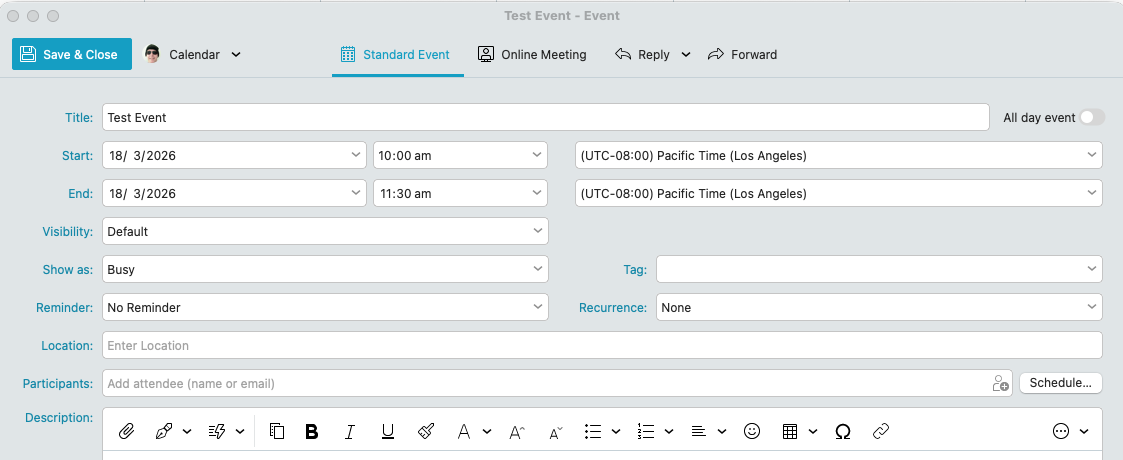
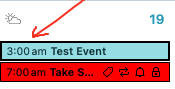
However if you create an event at 10am on the eg: 18th of March “but you choose a different Timezone on the right of the start and end time”, then when you save & close the event, the event time “will show a different converted event time back in the calendar view” and “can even sometimes change the date” when saved back in the calendar “depending on the timezone you set” as per the fourth screenshot start event time of now 3.00am on the 19th of March.
Thank you very much. I’d realised that myself in the meantime. I think that’s nonsense. Because if I want to check what time my appointment in Istanbul is next week, I want to see that it’s at 10:00, not what time it will be in Paris when I have that appointment, just because I’m in Paris when I check this. But perhaps I’m missing the point of this setting. At the very least, it would be good to have the option of setting the time absolutely, i.e. without taking the time zone into account (what’s easy to do with BusyCal). If that isn’t possible, the calendar module in the client isn’t an option for me, given that I’ll be travelling a great deal in the near future and will be in various time zones. It may be different for others.
You might need to put that on a Sleekplan suggestion.
If there is anyway to do that currently, someone will update this thread.
Should I? It seems to me easier and more logical to use a different app whose developers have taken this obvious point into account.
I believe it works exactly the same as in Outlook, the behavior the users expect.
I don’t know. I don’t use Outlook. In any case, I don’t expect that when I look up an appointment, it will show the time at which it takes place, but rather the time it will be at the place where I happen to be at that moment. I don’t expect that, and I can’t see what the point of it is either.
But that’s not really important. After all, I don’t have to use the client’s calendar; there are plenty of other calendar apps that handle it properly.
I am still not sure if I understand the problem. Can you post a video from Busycal what do you expect? I believe we really behave in a standard way as other calendar softwares, but maybe I’m still missing something. A video or screenshots would help.
No, I can’t do that because I don’t know how.
But it isn’t necessary either, because what I want is very simple: if I enter in my calendar that I have an appointment in Istanbul on 10 May 2026 at 11:00, that appointment will still be in Istanbul on 10 May 2026 at 11:00, even if I am in Paris whilst looking at the relevant page of my calendar. And when I look up this appointment (for example, to make sure I’ve remembered it correctly), it is completely irrelevant what time it will be in Paris when this appointment takes place. In other words: if someone in Paris asks me when this appointment in Istanbul will be, I want to look it up and find, for information’s sake, that it will be at 11:00. Because that’s what I was asked, not what time it will be in Paris at that moment. And of course it’s the same if I’m in Paris and someone from Hanoi calls to ask when this appointment takes place in Istanbul. The answer is always ‘11:00’. I don’t think that’s difficult to understand. And if it is, a video certainly won’t help.
In BusyCal, I can choose whether I want this (in my opinion, absurd) option, or whether the calendar always displays the time at which the appointment takes place. Or to put it another way: in BusyCal, I can easily set the calendar to display what I’ve entered, without it performing any arithmetic acrobatics with the time. This doesn’t seem to be possible in em client. In my view, the only explanation is that the feature wasn’t properly thought through.
Suggestion: An easy fix (probably) for eM Client team
I travel less now than I used to but I remember having the same need (and ethical obligation) as OP to put myself in the participants (to the event) shoes in order to assess the relevance and the convenience of the chosen date and time for them.
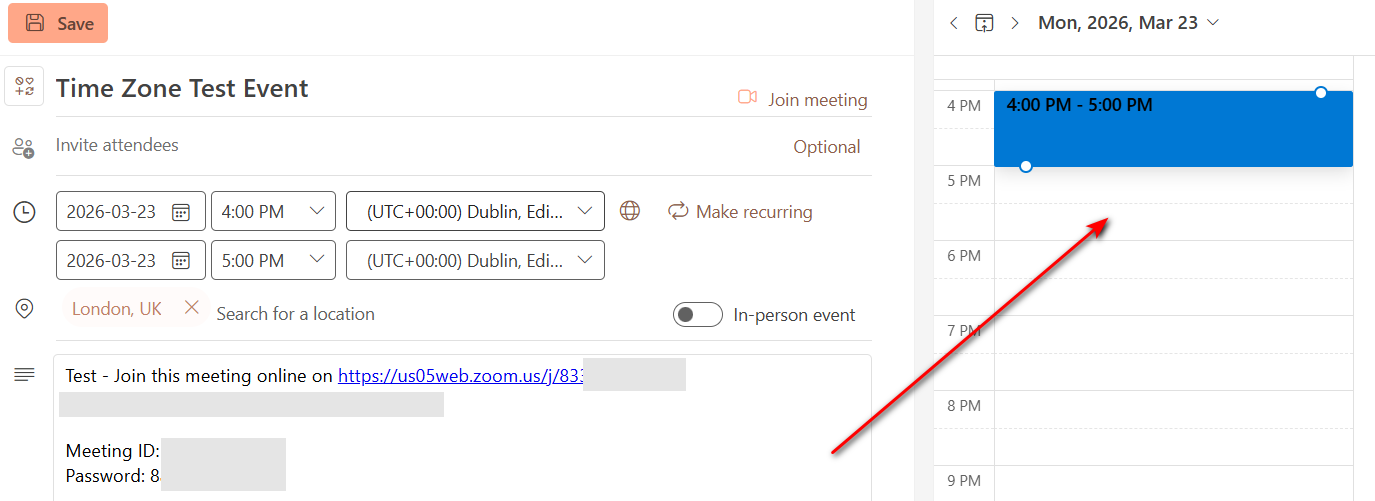
I’ve noticed that the info is unnecessary duplicated when you mouseover the event. I already know the time and the duration of the event in the time zone I’m in in the event box (noon in this example: Eastern Time US & Canada -04:00). Why not display the time zone of the event (4 PM London time in this example) instead in the geographical location of the event when you hover it?
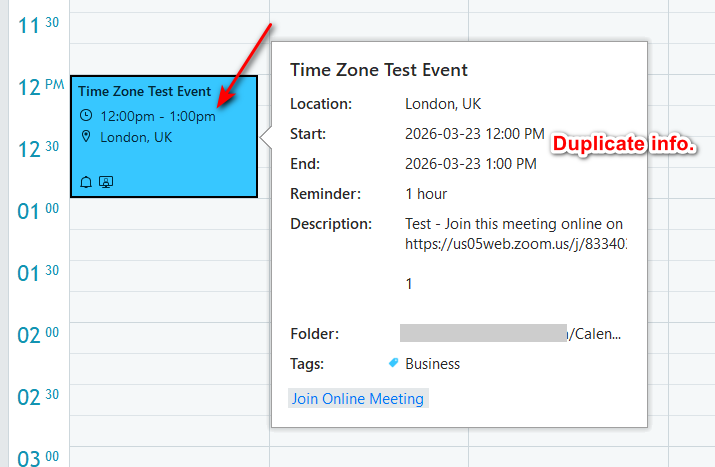
Addendum
I checked the same event in Outlook and interestingly enough, when you open the event, you can see what OP was referring to -If I understood their request correctly-: to be able to see the calendar in the event’s time zone.
Well it is not important whether you are in Paris, but what time zone is currently used in system. Are you really asking to show all the events in calendar in its local time? If I understand it right, in that case if you have 3 events in UTC 0, UTC +1 and UTC +2 all of them starting locally at 10am, you would like to see them at one time (overlapping) in the calendar?
If this really is the way you request these events to be shown it does not make much sense to me and I doubt any calendar app behaves that way.
However with upcoming version 11, we are adding 2 big improvements to the calendar that might help with your use case:
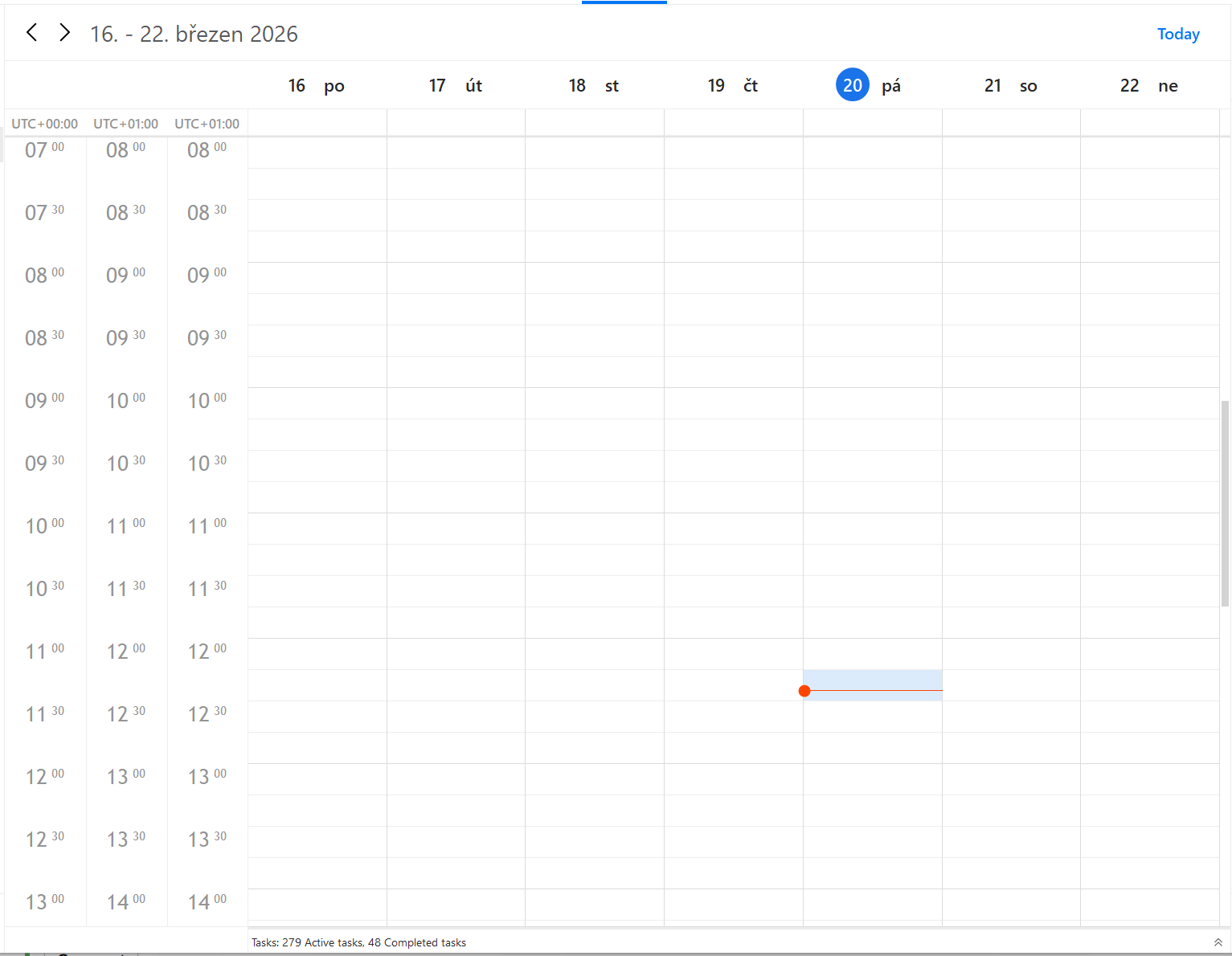
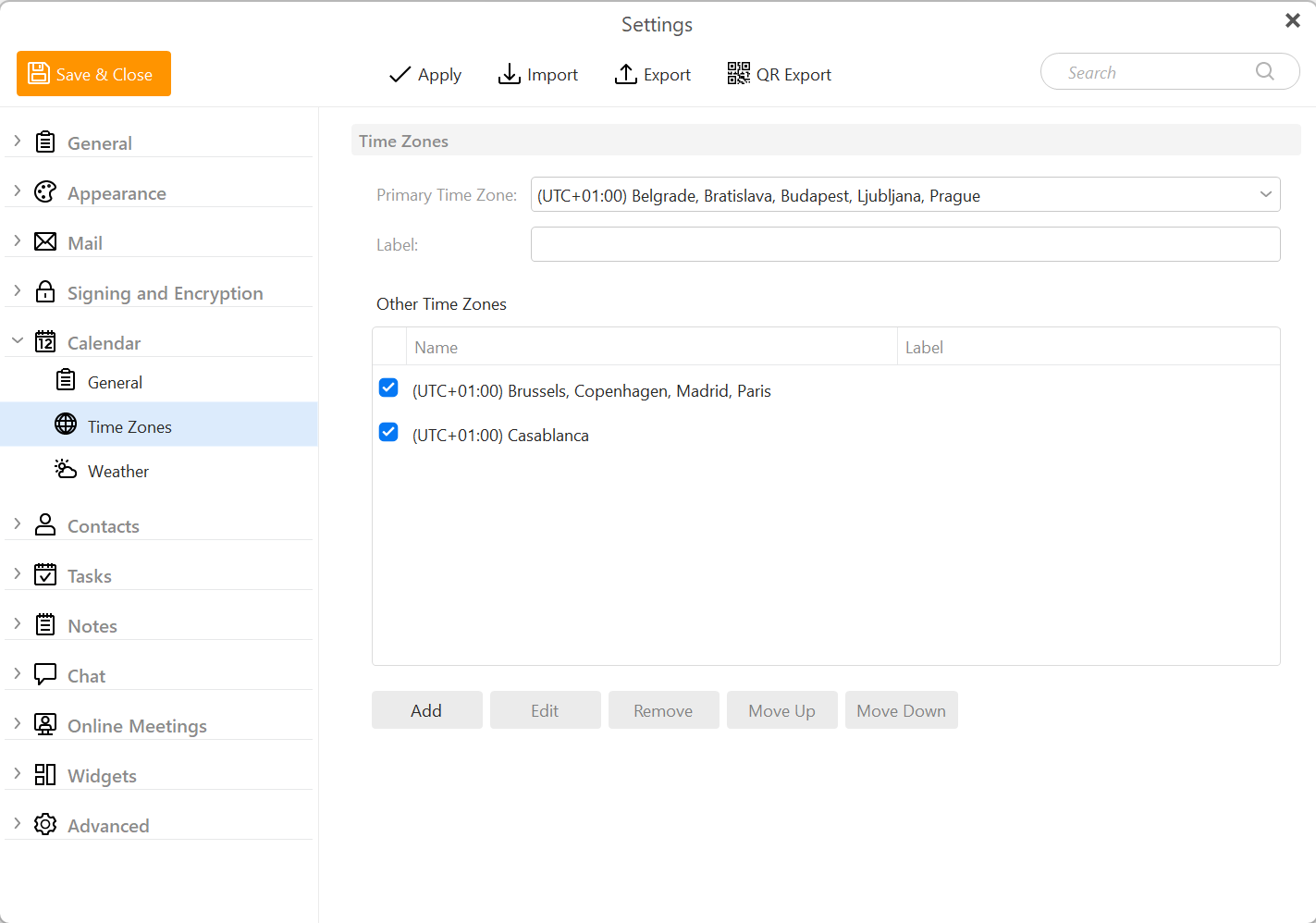
- It is now possible to quickly change primary time zone for eM Client’s calendar (and it can be different than the system one)
- Multiple time zones times can be shown in the calendar
Multiple Time zones in Calendar | Calendar | eM Client

I concur. I have been asking for these kinds of fixes for over/almost 12 months.
For example, I am planning a week long trip for a group I am part of. There are 3-4 different social events every day of that week.l As I get the agenda, I have been entering them in my calendar, so when I look at it in week view, I see what is happening on each day, and at what time (my work around is to enter the start time in the headline, and have them end before midnight.
That worked until I relocated from the timezone of the group event to one 3 hours earlier. Now those gant chats spread across 2 days, as I am entering them in the time zone I live in. Yes I could either enter them as if it was my local time zone, but when I get there, I have to adjust them all for the new time zone. With over 40 social events to change, there has to be another option.
Is any developer looking at this list?
Thanks !!!