Hallöchen zusammen,
ich habe bei Google diesen Beitrag hier gefunden.
Ich zitiere wörtlich: (Zitat Anfang )
Bei der Einrichtung der Kalendersynchronisation komme ich bis zu einem Fehler, an dem es nicht mehr weiter geht. Ich gehe über Menü > Konten > Konto hinzufügen > Kalender > iCloud Kalender. Bei der Eingabe der Benutzerdaten kann ich meine Emailadresse und das Passwort eingeben, bekomme aber die Fehlermeldung: Für CalDAV ist ein Kennwort erforderlich. Bitte geben Sie Ihren Benutzernamen sowie das dazu gehörige Ken…
Das tue ich noch einmal, aber die Meldung verschwindet nicht und ich komme nicht weiter. Gehe ich auf Abbrechen komme ich zwar weiter, aber meine Kalender werden nicht synchronisiert. In Outlook funktioniert die Synchronisation tadellos. Was kann ich tun?
Zitat Ende
Gesagt getan. Apple ID Email Adresse dann das Passwort dazu rein.
Jetzt kommt diese “blöde” Fehlermeldung:
Server meldet unauthorized ;-(
Ein weiterer Post zu diesem Thema
Ich zitiere wörtlich
Zitat Anfang:
Hallo, ich bin neu hier in diesem Forum und kenne mich auch noch nicht so gut damit aus. Wie wurde das Problem denn endgültig gelöst? Vielen Danke für die Hilfe
Zitat Ende
Jetzt meine Frage an Euch:
Wie wurde es gelöst? Oder kann ich vielleicht nicht richtig lesen?
Ich nutze hier folgendes:
emClient für Mac. Version 10.4.5642
MacOS: 26.6
Ich sag schon mal Dankeschööön
Liebe Grüße
Bastian
When you setup your iCloud account, you have to create an “App Password” for Mail, Calendar, Contacts and use that instead of your normal password. The Calendar URL is https://caldav.icloud.com/.well-known/caldav with your iCloud email address & app password if you are manually adding the calendar separately.
How to set up iCloud account in eM Client
Simply create an app-specific password for eM Client. You can find instructions in the official Apple guide.
Step-by-step instructions on iCloud account setup in eM Client can be also found on the web page eM Client with iCloud.
Hello Cyberzork,
thanks for your reply.
When I log into my iCloud and open my calendar… how OR better where can I find the things you said? I had looked I think everywhere but nothing with any password.
The internet link don´t work. My safari browser show me nothing, its only a white window.
I bet its very easy in the end but I´m not there in the end 
Thanks for your help
Like to see/ read you soon
Best Regards
Bastian
When I log into my iCloud and open my calendar… how OR better where can I find the things you said? I had looked I think everywhere but nothing with any password.
To setup an app password for your iCloud account, click the link below to login and manage your iCloud account.
https://account.apple.com/account/manage
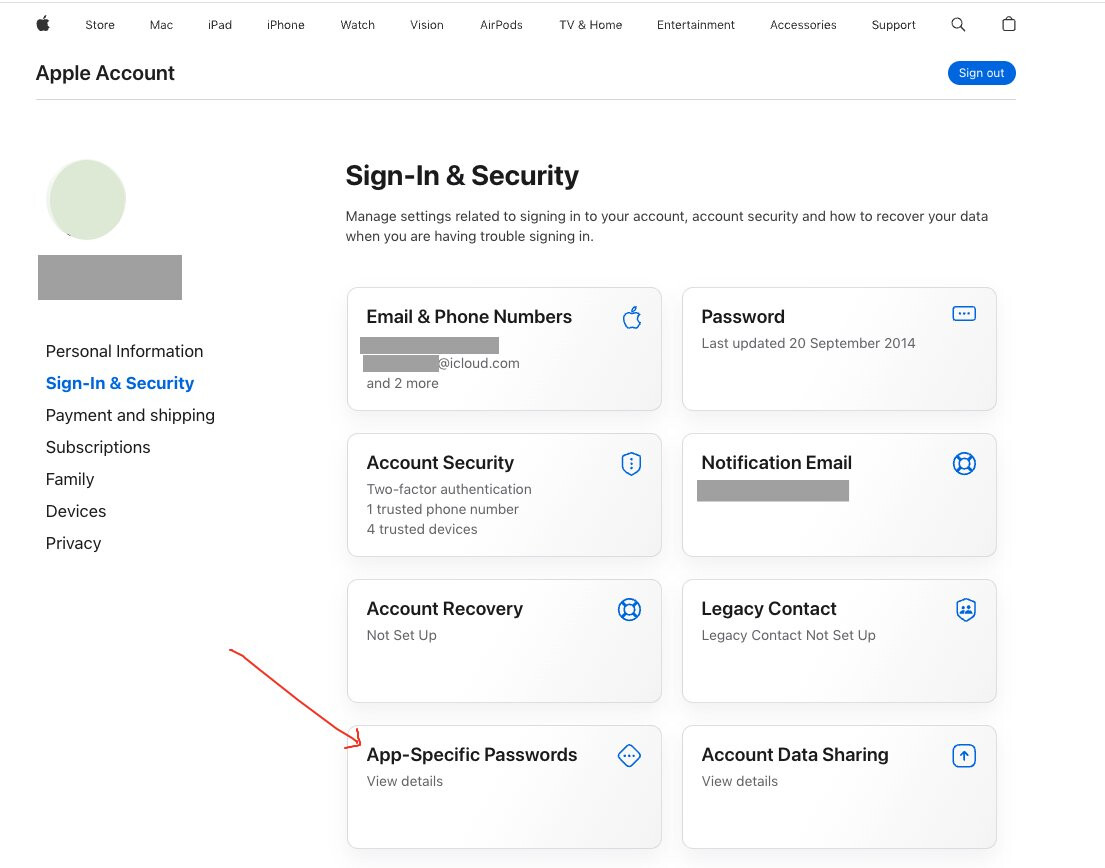
Then once logged in, click on “App-Specific Passwords” as per screenshot below and “generate an app password” for eM Client. Then use that as the password in eM Client when you setup the iCloud account via the wizard https://www.emclient.com/em-with-icloud
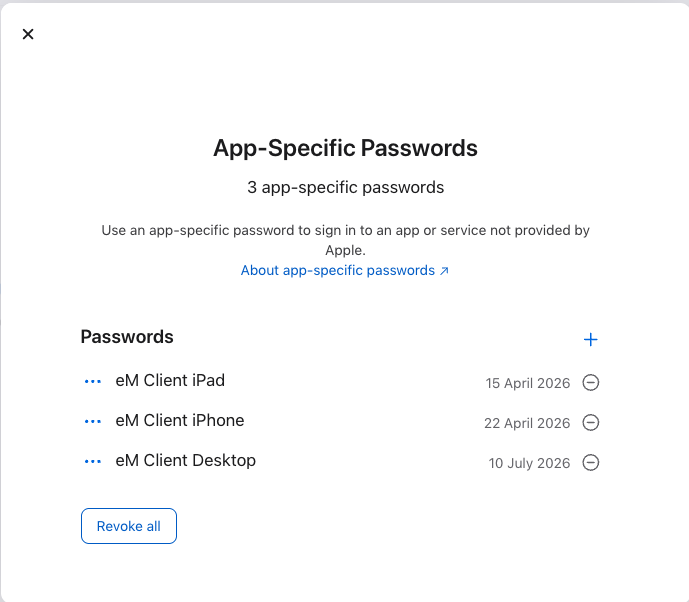
Also if you have an iPad or iPhone and want to use eM Client mobile apps “you also need to generate separate app passwords” for those too as second screenshot example below.