After coming back from a 2 week vacation, my gmail have 3500+ emails. A lot of those are server alert emails that I have used EM client to filter out into another alert folder. However, it takes almost 4 hours just to download all emails from gmail via IMAP. 99% of the emails have no attachment and the email is not large, but it takes forever to download.
I wonder if there is anything i can do to speed up this download process?
However, it takes almost 4 hours just to download all emails from gmail via IMAP.
That’s good as my own took around 2 days to fully sync / cache as I had around 50k+ emails.
I wonder if there is anything i can do to speed up this download process?
The downloading of IMAP emails is primarily to do with you internet download speed and computer speed & the size of your online mailbox, but you can certainly speed up opening / reading of emails “firstly by using the latest version” 10.4.4209 which is now really optimised and available via the release history page if you don’t have it already. If you do update make a manual backup first via “Menu / Backup” incase you need to restore for any reason.
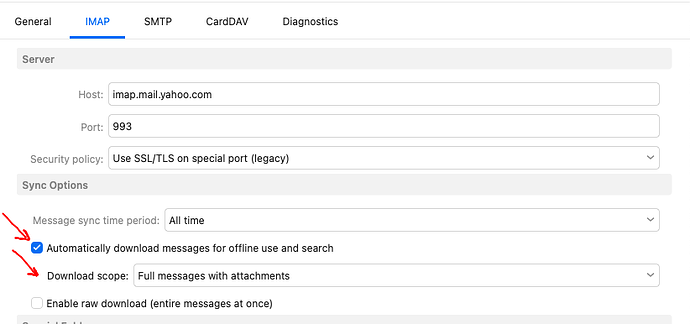
Secondly you can also speed up reading of IMAP emails via setting your Gmail IMAP account “Sync Options” to “download messages and attachments offline etc” as per the below V10 Yahoo example. It will use more local mail database space but will speed reading up.