hi, i have “all mail” enabled in my gmail account yet i keep getting error warning, on eM Client (Win11 OS), for the gmail account stating that all mail is not enabled. I have checked the settings with mozilla and chrome and they both show that “All mail” is enabled. What can i do? Thanks in advance
Could be then you either haven’t enabled the All Mail folder in your Gmail account online yet, or you haven’t enabled IMAP in your Gmail account online or you have a problem with the account.
So first go to your Gmail account online via a web browser. Then at the top right, click Settings and then click All Settings. Then click the “Labels” tab and make sure the All Mail folder is set to Show and is enabled.

Next click the Gmail online All Settings / “Forwarding and POP/IMAP” tab, and make sure IMAP is enabled.
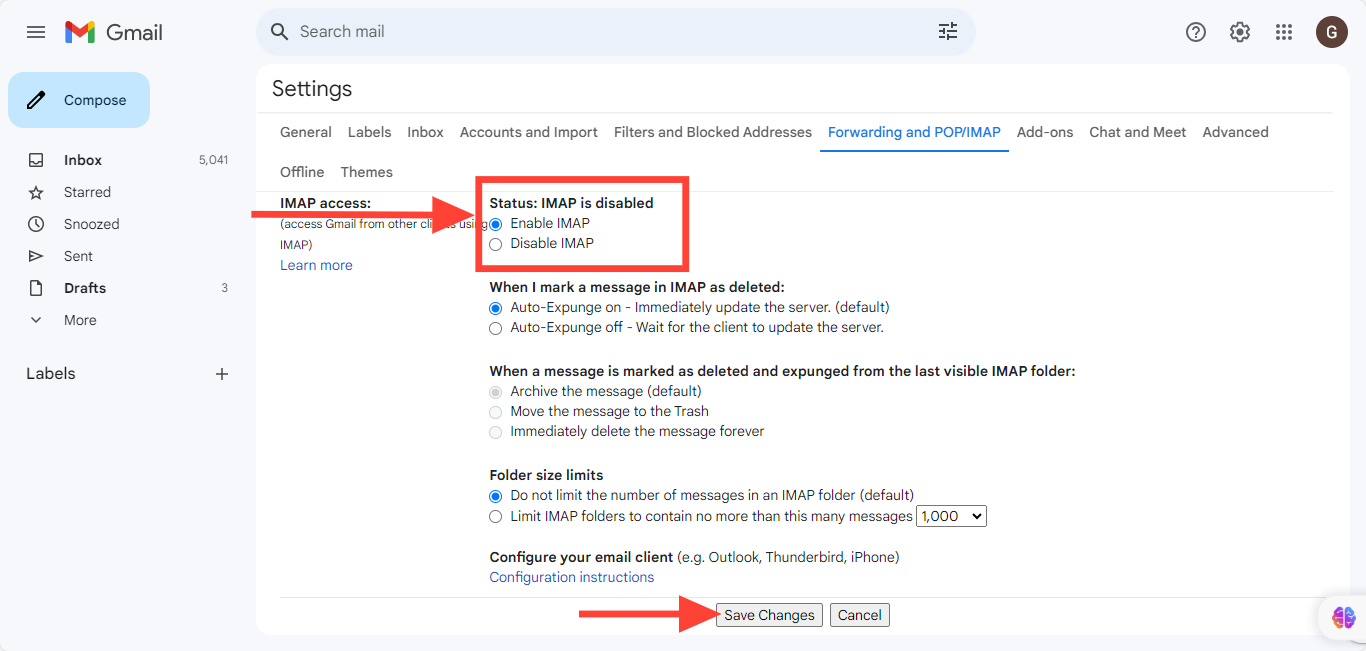
If All Mail is already enabled online in your Gmail account, “then it’s either disabled in the account folders” or “you have a problem with the account”.
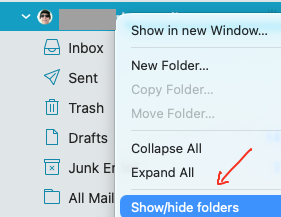
So to enable All Mail in your Gmail account folders, “Right click on your Gmail address” above your Inbox and click “Show/hide Folders”. Then make sure All Mail is set to “Show” as in the below example.
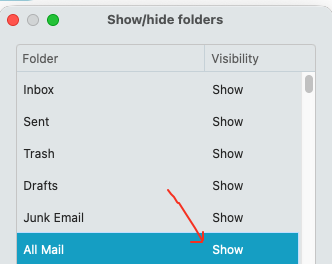
If it’s then already enabled in Show/hide folders, then “the All Mail folder might be hidden” below the “More” menu under your Gmail account.
So next “open the More menu at the bottom” under your account, and you should then see All Mail, where you can “Right click on All Mail” and “click Show” to move it above the More menu


If you still don’t see All Mail under your Gmail account More menu “but you see it online in your Gmail webmail ok”, then go to “Menu / Accounts” and remove and readd your Gmail account via the “automatic account wizard” which should normally fix that as must be then an account problem.
“eM Client with Google Workspace” setup
Thank you for your reply. Much appreciated. I had done all the above. A reinstall of eMC fixed the issue. Go figure. Maybe I had a corrupted profile?
Anyway, I am loving eM Client 
It is not cheap to buy but after suffering with MS Outlook (stand alone version and 360), then Thunderbird then Better Bird and various other programs I am amazed at how well eMC works on my machine and how little resources it consumes.
All the other programs would blow out my ram allocation (to nearly 100% of installed 16GB ram) but eMC runs very light and I no longer have to consider upgrading my ram to 32GB.
Such great software (teething problems aside) 