Not sure what changed or how to fix it, but all html links embedded in received emails are no longer working. I’m using Mac OS 26..5, Chrome 151.0.7922.108 eM Client 10.4.5642 (2a058e0). Links that worked a few days ago no longer work. All email links work fine in Postbox and Apple Mail. This seems to be eM Client specific and it just started happening yesterday or the day before.
Not sure what changed or how to fix it, but all html links embedded in received emails are no longer working
I’m using Mac OS 26..5, Chrome 151.0.7922.108 eM Client 10.4.5642 (2a058e0).
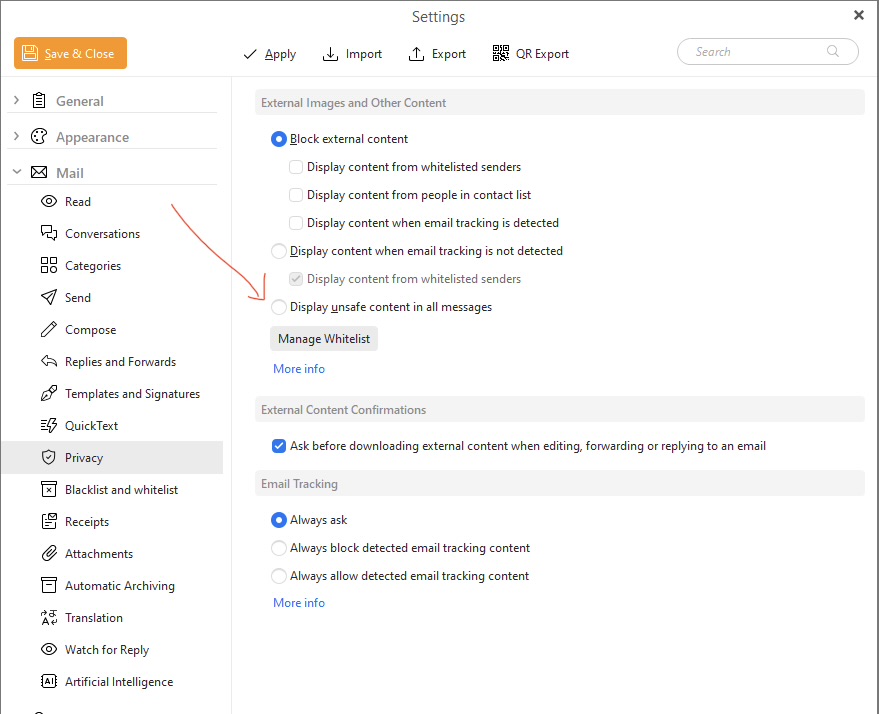
Could be you might have external content blocked.
Go to “Menu / Settings / Mail / Privacy” and for a test set it to display unsafe content in all messages and and save settings to see if that shows & opens your embedded html content / links.
If that works, then you can adjust the Privacy Settings to what you want as per the following help documentation below.
If adjusting the Privacy Settings still makes no difference, then try the latest Mac version V10.4.5647 just updated with fixes you can try via the release history page. If you do update make a backup first via “Menu / Backup” and close eM Client before updating.
Privacy documentation