Hi…
Is is possible to disable all AI features? And avoid any large associated downloads?
1 Like
was already possible in V10
Ok, so it is possible then. Thanks
The AI option can be disabled in V10 & V11.
“Menu / Settings / Mail / Artificial Intelligence”
“Menu / Settings / Artificial Intelligence / General”
“V10 AI Settings screenshot example”
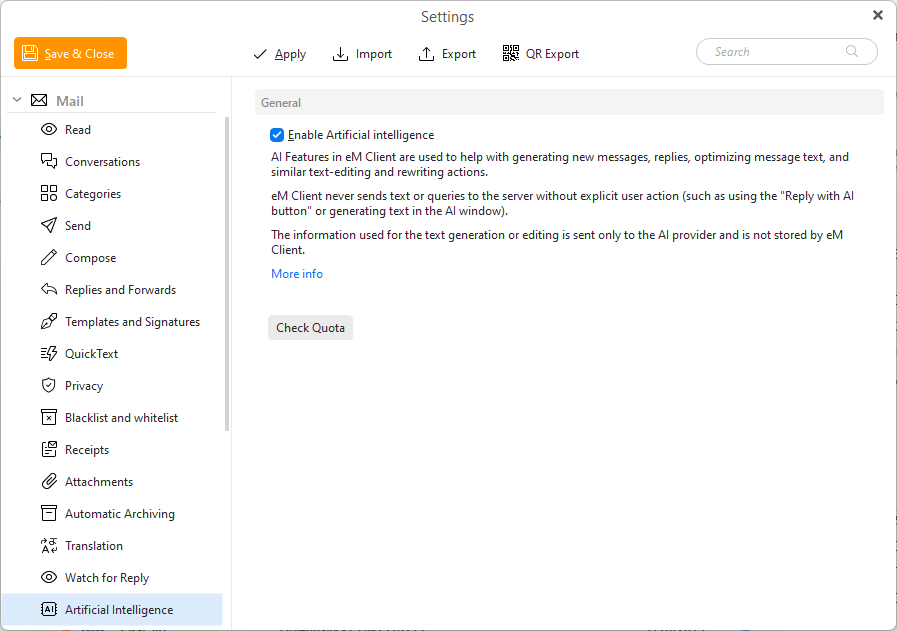
Yes, very disappointed you’ve been seduced by the AI obsession. I’ll try the new version, but I’m tending to move away from those who think AI is a desirable feature.
I get you; I find it infuriating myself when AI is the answer to everything and anything.
That said, they have to ride that wave, whether they like it or not, just to stay marketable. And it’s completely optional, so it doesn’t impact you unless you decide to use it.
Also, it can be really useful when researching long mail threads from the past, e.g.
What I don’t get is that people let it write entire mails; that’s something I’m perfectly capable of and not handing to a machine.
I also use a local model, so there’s no data wandering off to the cloud.
2 Likes
My only possible use for Ai in my email program would be to spot spam incoming that the server missed.
I personally don’t use AI at all except to say that when testing it, the Natural Language Search makes it easy for finding / emails, & Natural Typed Text for auto creation of rules was excellent.
Can AI replace message rules already?
Would be nice if I could “tell” emClient to
Move all incoming e-mails in account “thisorthat” from person x or z or with e-mail-address [email protected]" to folder “Company” and tag them with “Advertisment”
THIS would be a nice feature and a perfect job for AI instead of static rules.
Yes you can tell it with Natural Typed Text to automatically create the rule you want, and you can modify it after it’s created if you need to manually to tweak it.
I created most of my rules when testing via Natural Typed Text & didn’t have to modify much.
1 Like
That’s a perfect first step into the right direction 
A next step would be to drop rule creation entirely, no matter if they are created manually or with help of AI and use natural language solely.
E.g. set up as many AI rules as desired, give them a name and a certain order in which they are executed or just by dragging a rule into the desired position and let them run each time a message arrives or was sent out.
Add a additional option could be “Stop the (AI) rule” once it was successfully executed with one or more hits
I do believe that AI can make everyday life much easier, particularly when it comes to email;
unfortunately, there are a number of significant issues here that have been overlooked.
Firstly, it’s incredibly difficult to find out which AI is actually doing the work, which model is being used, where the data is being sent, and where the privacy policy for the AI model is. Can I choose the AI model myself? And let’s be honest, why isn’t there an API so I can simply use my own AI model (local or cloud)?
So you could say that the company has suddenly **stopped giving a damn about personal data protection. I mean, what other reason could there be for this? The extremely important information about where and what data is actually being transferred to some cloud belonging to some data behemoth, or is it running in the provider’s own cloud? I don’t know; it’s not stated anywhere. It’s so poorly documented that one almost has to assume it’s a breach of the GDPR.
I don’t even have to press the wrong button. The AI is always enabled by default; if I just keep clicking ‘Next’, the AI is simply activated and any sensitive data belonging to my customers or very personal data ends up in the cloud, in the hands of God knows who.
I don’t want to have to search through the entire website just to find the information that matters.
I want there to be a link next to the button that activates the AI system, which provides me with comprehensive and detailed information on data protection, covering everything relevant, including the General Terms and Conditions; in my opinion, anything else is unlawful and, for me, a clear reason not to use this programme in future. (I’ve renewed my licence three times so far.)
Because it seems they’ve prioritised convenience over data protection. The only reason I used this client was for data protection, because it isn’t linked to Microsofts services, and now, if I accidentally press the wrong button during installation or if something goes wrong with the programming, then my data might end up being leaked to some bloody AI. No, thank you!
I suppose I’ll have to get used to using Thunderbird again.
I can’t use my own AI. I run local AIs, it’s very handy for certain things, and for some tasks, small models are sufficient.
There are major providers who offer completely secure AI communication with zero-knowledge encryption throughout the entire processing chain. But I can’t use them. All I can do is press a button. And quite honestly, that’s far too risky for me with a provider that makes it so difficult to find the privacy policy or, who goes to such lengths. To hide the extremely important information about what actually happens to my data and how it is processed.
If I didn’t care whether an AI processed my data and whether that data ended up in some gigantic cloud facilities, I would install Gmail and link it to ChatGPT or Claude. This would, in all likelihood, deliver significantly better results than the so-called ‘built-in’ AI here, which is of course not actually built in, but rather a link to an external processing facility.