Hallo everybody!
That would be my question, that is it possible to add a new user interface language to the installed program?
If yes, what is the way of?
You can change your user language interface by going to Menu >> Settings >> Choose Language > (select a language in the list) >> Then Save and Close.
Thanx for your answer, but my question is not to change, but ADD, what is not in the list.
miércoles 22 febrero 2023 :: 0934hrs (UTC +0100)
I changed you rpost to ADD in Feature REquest
Perhaps you can state the language you would like.
skybat
¡Saludos desde Sevilla la soleada en España!
Hablo español, luego portugués e inglés, con conocimiento de varios otros idiomas.
Hi Skybat!
My “paramount wish” would be the added Hungarian Language to the list.
Brgds.
Hungarian is already available.
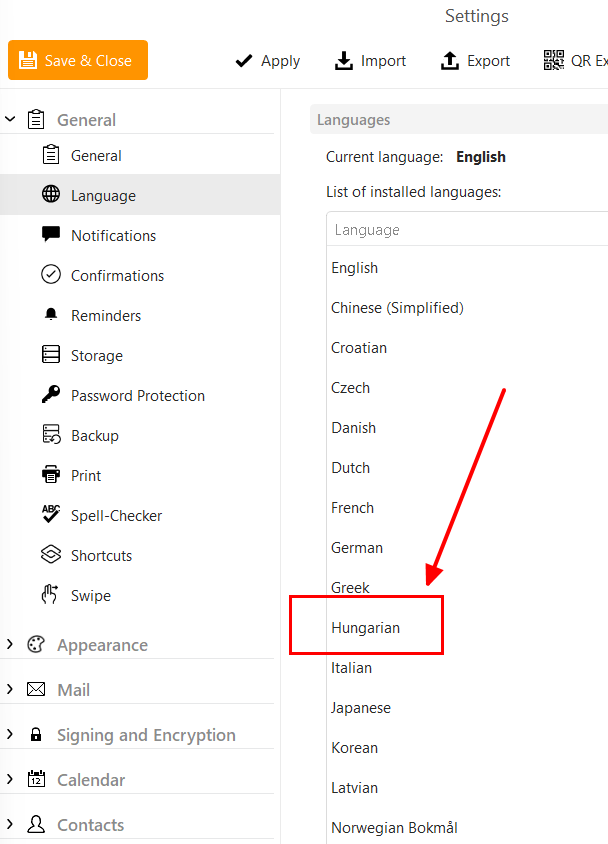
If you don’t see it, do the following:
-
Close and uninstall eM Client, making sure NOT to delete the database folder when asked. That will ensure all your data and settings are there later.
-
If it exists, delete the C:\Program Files (x86)\eM Client folder.
-
Download and install the latest version from here: https://www.emclient.com/dist/latest/setup.msi
-
Restart eM Client.
Thanx!
I will do according description. 