I migrated from Outlook with 6 mailboxes (2x exchange, 1x imap, 3x pop3). While trying to customize the user interface, I “managed” to remove two of the pop3 accounts from the navigation pane …
They are still visible in Settings > Accounts, can be chosen as sender when creating a new mail, and seem to be working – but I cannot see them in the navigation pane any more.
Any idea how I can restore their display in the navigation pane?
I “managed” to remove two of the pop3 accounts from the navigation pane …
They are still visible in Settings > Accounts, can be chosen as sender when creating a new mail, and seem to be working – but I cannot see them in the navigation pane any more.
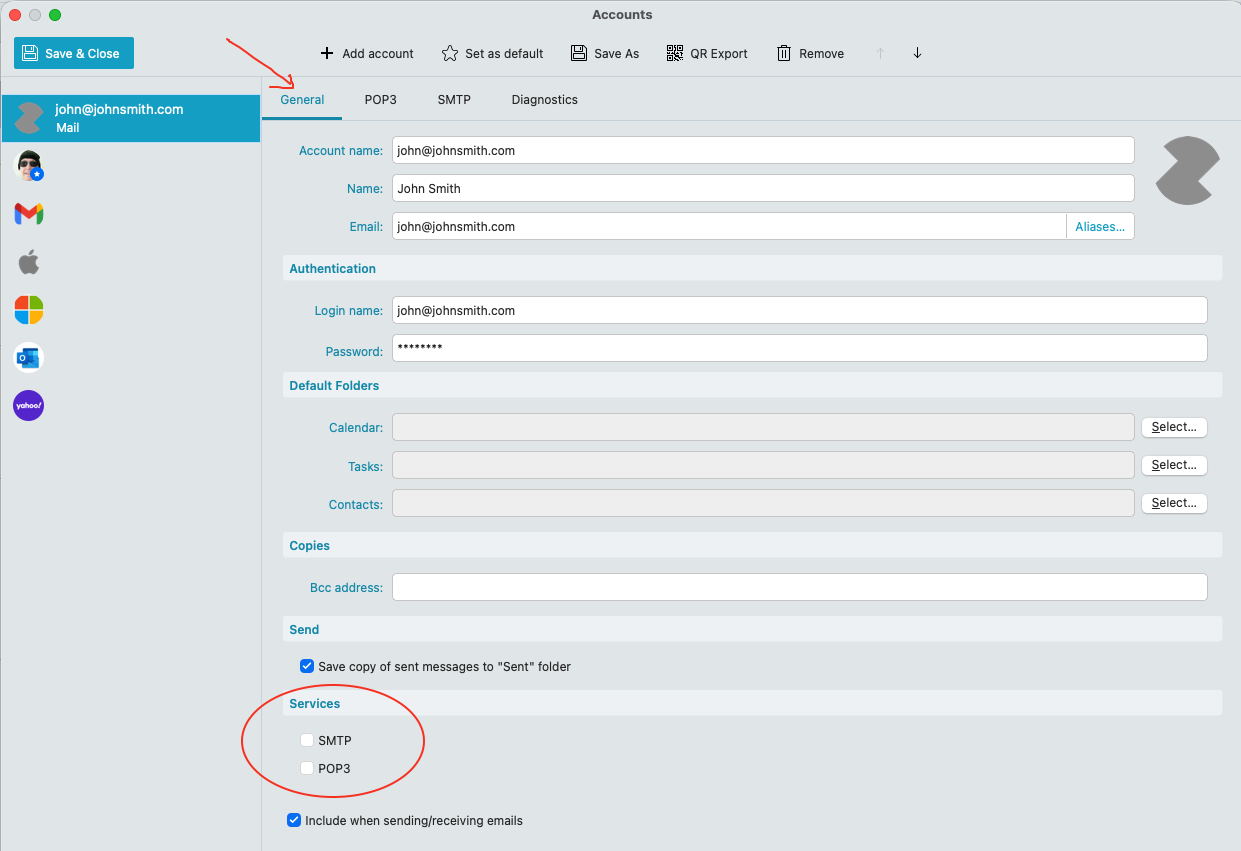
That usually means “you have disabled the POP3 and SMTP Services” which then only shows in Accounts and not in your Folder list.
Go to “Menu / Accounts” and click on your POP accounts “General” tab and re-enable SMTP & POP3 under Services at the bottom and then “Save & Close” as per the example below.
Thank you for your response. Unfortunately, that doesn’t help. All three pop3 account have 100% identical settings - but only one is visible in the navigation pane. I can send e-mails from those accounts by choosing them in the “New Mail” window.
Ok if the POP accounts already have those POP3 and SMTP boxes checked under Services, then “try unchecking them” and then Save & Close accounts. Then reopen those accounts and “re-enable those Services” and Save & Close accounts again and see if they appear.
If they still don’t appear “unless another user on this forum has any other ideas”, (if those POP account Inbox messages are no longer on the server), I would suggest next to “export both those POP account messages” to a folder on your desktop in (.eml) files via going to “Menu / File / Export”.
Export email to .eml files documentation
https://www.emclient.com/webdocumentation/en/10.0/emclient/Default.htm#Getting%20Started/Export/Export%20E-mails%20to%20.eml%20files.htm
Then once both POP account messages are exported, “delete those POP accounts” and then re-add them. Then once re-added, import the exported (.eml) messages back to each POP account via “Menu / File / Import”.
Import .eml files into eM Client documentation
https://www.emclient.com/webdocumentation/en/10.0/emclient/Default.htm#Getting%20Started/Import/Import%20from%20.eml%20file.htm
Or if those POP accounts messages “are still in your Inbox at the server mailbox end” (if you had leave a copy of messages on the server for x days enabled), then just remove and readd the account and see if those mail accounts appear.
Note: Before removing and re-adding accounts, first make a manual backup via “Menu / Backup” incase you need to restore for any reason. You can see when the backup is complete in “Show Operations” via the dropdown on the right of Refresh.
Thank you for this suggestion. I already discovered exactly that on my own - exported all mails, deleted the accounts, added the accounts again and re-imported the mails. That worked.
Still strange though …