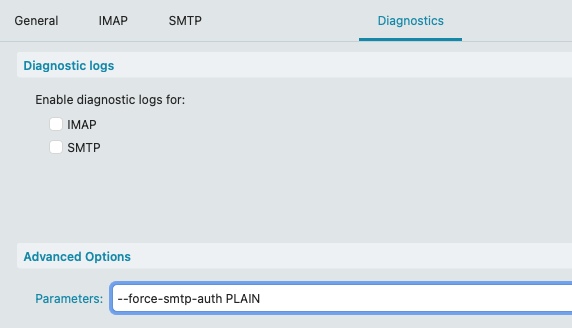
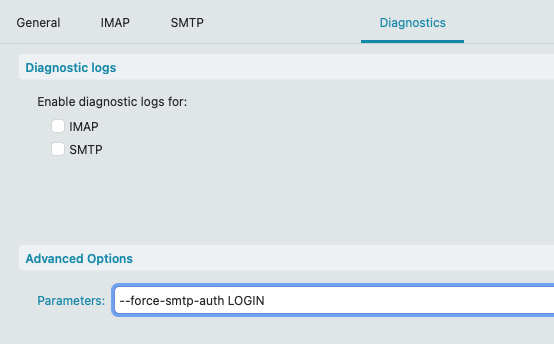
I’ve searched the forum already with this error code but nothing worked for me. I’ve really tried all SMTP port and SSL combinations. This problem only persists with emClient. With my Samsung Mail App i’ve no problems sending mails. Now I’ve contacted my provider and he sent the following answer:
according to the log, you are using an incorrect authentication method, which leads to many failed login attempts.
These in turn will result in your IP address being blocked.
Please make sure that the authentication method is set to one of the following options in the email client’s server settings.
Password, normal
Password
unencrypted password
or something similar
If you can’t find ways to edit the setting in the email client, it can help to completely remove the email address and add it again.
Thanks for your response.This just regarding the SMTP server/outgoing mails. IMAP/incoming mails are working fine.
tried every combination of port&SSL: 465, 587 (use SSL/force SSL/SSL Legacy)
eMC version is 10.3.2619
Win 7 64
my service provider is called prosite.de
This just regarding the SMTP server/outgoing mails. IMAP/incoming mails are working fine.
That smtp sending error is usually because of an eg: outdated or older server CRAM-MD5 authentication method, so won’t work with newer mail client authentication methods like in eM Client 10.
So you normally need to "force the older plain text authentication” allow to send mail. So apart from having the correct SMTP server settings, you need to put in the “diagnostic tab parameters” either of the following.
SMTP
Port 587 = Force usage of SSL/TLS
Or
Port 465 = Use SSL/TLS on special port (legacy)
Having had similar problems, POP3 and/or SMTP, while setting up my 12-17 accounts in eMC (an eternity ago, it seems) I would always try and contact the mail provider first. In the case of two accounts hosted by the same provider, I had to contact their support, who then fixed things manually for each account at their end. No idea what the problem had been, when I asked they got back with a non-reply reply. Another provider couldn’t do anything about the POP3 issue because of their peculiar use of an external, incompatible daemon, so instead I’m having incoming mails there forwarded automatically to one of my functioning accounts.