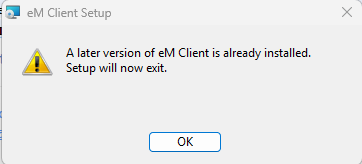
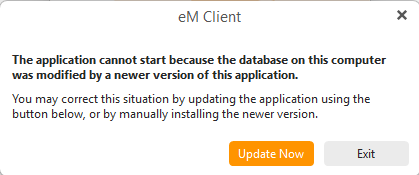
After updating to 10.4.5600 today, my Local Folders subfolders disappeared completely. I have nearly 190,000 emails in a subfolder called “Archived Inbox Through 2019” that is no longer visible.
My setup:
Windows 11 Pro
Custom storage path: C:\eM Client Email (Bill’s Current Active Email)
Local Folders is checked in Settings > General > Folders
Storage path is correct in Settings > General > Storage
What I have tried:
Confirmed Local Folders is enabled in Settings
Confirmed storage path is correct (similar to Jane22’s issue in thread #115991)
Ran /dbrepair from command line
Swapped folders.dat back to .bak from before the update - folder structure returned but no emails
Swapped mail_index.dat and mail_fti.dat - no reindex occurred
Hi, first priority: please make sure you have a backup/copy of your database before making any further changes, if you don’t already.
Then, could you try reinstalling 10.4.5326 Release History | eM Client and see if the folders show up there? And did anything unusual happen during or around the update, crash, sudden shutdown, anything like that?
I did make several backups prior to starting anything. I can not reinstall 10.4.5326. I tried but emclient install process will not let me regress to an older version. Nothing un-usual happened other than this feeling of dread, LOL, when I started upgrading. No shutdown. But when I opened emclient after the upgrade, all of my emails were gone and it changed the path to emclients default. So I changed the storage path back to my original email folder and then upon running it, I found local folders contents (2 different subfolders) GONE!
If you have a backup from before you installed the update, close eM Client, rename this database folder to launch eM Client with a new database, and then use Menu > File > Restore to restore from the 10.4.5326 backup.
I don’t have a backup from from 10.4.5326 because 10.4.5600 was working (so I thought). Not to mention the hundreds of new emails that would be lost to a restoration, anyway. You don’t have a tool to fix this? It was a bad update that broke my email.
Nothing should be getting lost during updates. That said, it’s always worth keeping regular backups for anything stored locally, so we always recommend setting up Automatic Backups (Settings > General > Backup).
If you’re willing to share the backup you made before you started making changes, you can send it to [email protected] and we’ll take a look.
I have a previous version of all of the emails in question that are no longer in the LOCAL FOLDERS folder, since the update. I went to the previous PC and exported the emails to emdf and tried to import them to the LOCAL FOLDER. They will not import though I get a popup saying they did in one second. 191k emails. So the new version will not let me import them.
I looked at you post early Saturday morning and got called away before
I had time to reply, however, I now see that @Kim_Fisher has been trying
to help you out of a situation that exists because of actions taken.
I am not really clear exactly what you have done, except say -
It was a bad update that broke my email.
Notwithstanding this, you mention another PC and eMC v9*
Do you have ANY eMC Backup that you have not touched that contains
your original configuration and emails?
If you do get back to me and I will make a suggestion that may, in part,
be able to help you.
It is up to you to decide what you want to do..
¡Buena suerte!
¡Saludos desde Sevilla la soleada en España!
¡Mis mejores deseos y mantente a salvo!
I re-exported from my old PC the LOCALS FOLDER these old archives emails, this time using the .eml format. Now importing them into my 10.4.5600 PC. So seems to actually be importing them. Hoping that emclient gets to the bottom of their bad 10.4.5600 update and they release a safe fix soon. This buggy 10.4.5600 update, should have never gone out.
After you reimport your archived .eml messages as you have so many, i would suggest to “create a new data file” and copy those archived local messages into that as another backup.
After copying your messages to the data file, “unmount it” and then backup the data file to another drive. Then “re-mount it” and see if you can read those messages in the data file.
Also then make a new manual backup via “Menu / Backup” incase you need to restore. You can see when thats completed in Show Operations via the dropdown on the right of Refresh.
I hope you are successful importing your files.
You should take the advice of @cyberzork and also make regular Backups
as suggested by @Kim_Fisher - I agree with and endorse both.m
Further I do not believe that there is an issue with the eMC v10.4.5600.0
update per se but something unfortunate to your particular circumstance,
these things do happen. I am aware of hundreds if not thousands of eMC
upgrades with no issues.
In every instance there is always a rule to make a backup immediately prior
to the upgrade and run the upgrade with eMC shut down.
Again I hooe your import works well.
¡Buena suerte!
¡Saludos desde Sevilla la soleada en España!
¡Mis mejores deseos y mantente a salvo!
Of course i make multiple backups everyday of the entire database folder. It just so happens that this came at a bad time when I was transferring everything over to a brand new PC. Then came the emclient upgrade. So my previous backup version was of the previous version but did not contain all of my new emails on my new PC. So it was a choice of losing all of my new emails or having to go thru yet another process to save them or try to work with the new version, which I did. All emails have now been restored.