Can you please implement a per folder unread email count? I have a lot of nested folders and the top folder does not show a child has a new email hence I keep missing them. Need something like:

Can you please implement a per folder unread email count?
Using eg: eM Client 11.0.1389 with IMAP accounts it does currently show the number of Unread in the Parent and Subfolders in blue on the far right as per below account screenshot example.
What “account type” and “version of eM Client” are you using and “what Theme” are you using ?

11.0.1389 (8b6849e). Business. Modern theme
11.0.1389 (8b6849e). Business. Modern theme
Ok i use that Modern theme and other light themes and all unread number shows fine on sub folders, so could possibly be if you have Show counter for Recent messages checked in Settings, or could be to do with your specific account / server thats not showing them.
So first go to “Menu / Settings / Mail / Read” and make sure you have unchecked Show Counter for recent messages instead of unread as per below example screenshot.
If you already have that unchecked that, then update what mail account you have & who hosts it, and also if its a POP, IMAP, Exchange, Office 365, Graph or iCloud account.

That option was ticked. After unticking I get a message count on the end sub folder but not on the folder(s) above. Its IMAP through my domain provider ventraip (axigen).
That option was ticked. After unticking I get a message count on the end sub folder but not on the folder(s) above. Its IMAP through my domain provider ventraip (axigen).
Do all the parent and sub folders all show the unread number online in your webmail ?
Hi
In webmail, no. Same result as EM Client
I just sent a test message that has a rule to move it to INBOX>WEBSITE AND COMPUTING>WORDPRESS and WEBSITE>POST SMTP.
Unread folders counts, No count against Inbox, Website and computing or wordpress and website. Count against Post SMTP.
Not sure why the webmail would be relevant, isnt this derived at the EM Client end not the server end?
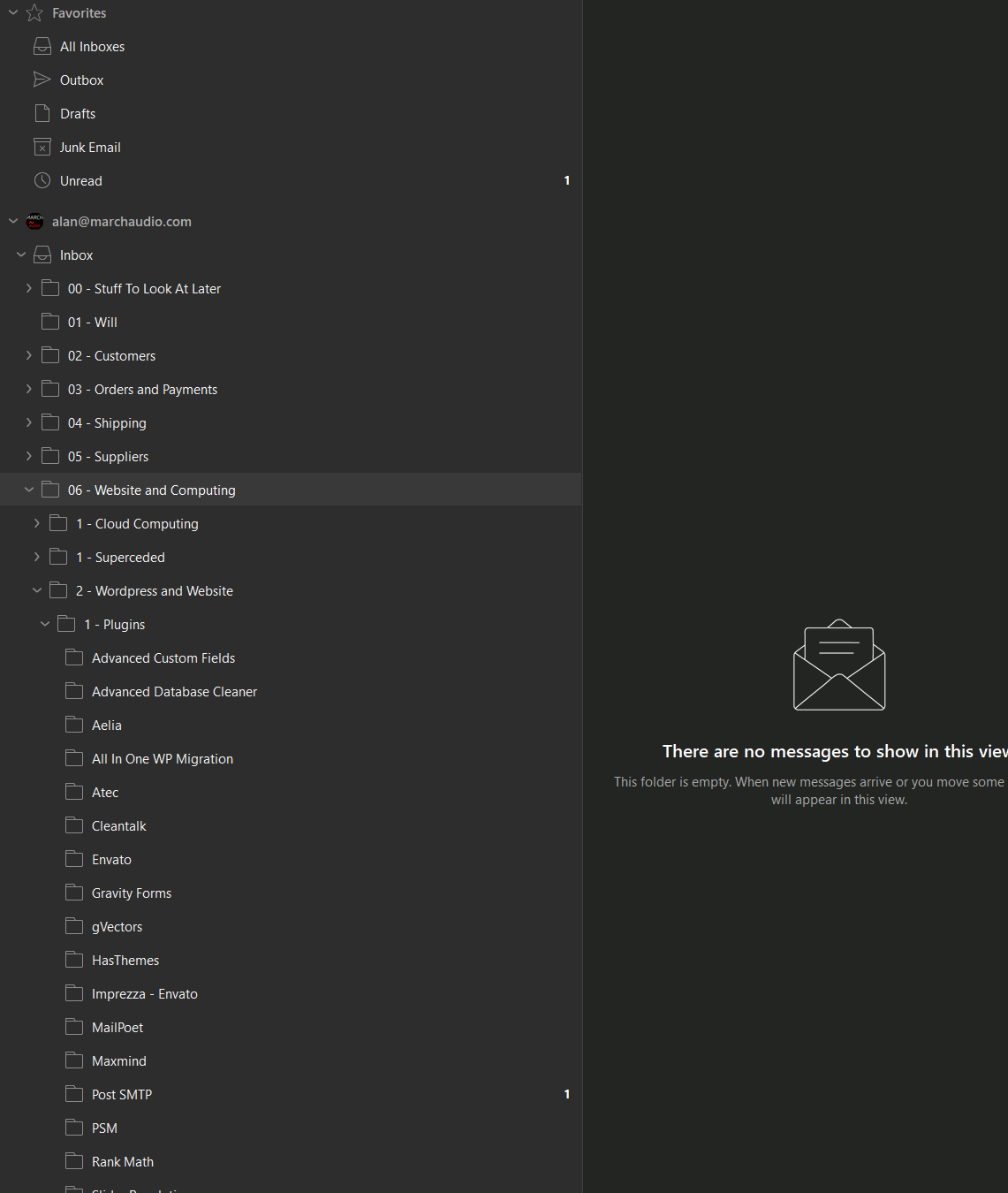
As your webmail is showing the same issue, that then does sound like to me a possibly mail server problem or mail server setting to me marking the parent folder Inbox message read so is then reflected in eM Client as read & no count appears.
Not sure why the webmail would be relevant, isnt this derived at the EM Client end not the server end
eM Client gets those unread parent folder counts and sub folder unread counts from the server end with IMAP account setups when the client syncs/updates. So if the mailbox folder message on the server end has already marked it as read, it won’t show the unread count on the right of the folder in eM Client.
Sometimes this can happen if eg: another device like a mobile phone / tablet / laptop configured with the same IMAP account reads the inbox folder message or parent inbox folder message and marks the message on the server read so then eM Client won’t show the unread message count. So if you do have other devices configured with that same IMAP account setup, close them and just test the desktop separately to rule out if its one of those devices doing it.
If its not a mail server problem or mail server setting or other device causing it, then it might be something to do with that rule you have setup at the top of this post possibly causing the server to mark the Inbox message as read so is showing no count when eM Client syncs your Inbox.
I cannot find anything about your specific ventraip (axigen) mail server and that unread parent or sub folder count issue on this free community forum, so suggest you contact offical support who can investigate it.
So if you have only just connected to eM Client and are still inside your 30 day trial, send an email with the problem to [email protected] and link this thread so they know all the info.
If you are outside your 30day trial and have a Pro, Personal or Business paid active license, go to the VIP support page and login and lodge a support ticket with that problem and link this thread.
Apart from that other users on this community forum with that same ventraip (axigen) server asnd an IMAP account setup might comment.
1 Like