There doesn’t seem to be a way to display the number of emails in a folder. I thought this feature existed in EM client but I can’t seem to find it in version 11? Is there no way to see the total number of emails in a folder?
There doesn’t seem to be a way to display the number of emails in a folder.
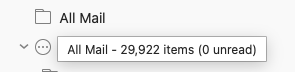
To display the number of emails in a folder “Hover your mouse over the folder” as in the Gmail All Mail folder example below.
Good find. Thanks.
Disregard. Turns out it does show the number of emails in a folder - at the top left side of the message list.

1 Like
Okay. I thought I was going crazy yesterday after I found the message status bar at the top of the message list since I could not find this before. Turns out I’m not crazy. The screenshot showing the number of messages at the top of the message list is from EM Client 11 on my HTPC. However, the same version of EM Client on my workstation and my computer in my office does not show up. I finally realized that there seems to be differences in the way the status bar shows up by default - maybe as a result of installation settings when it’s installed, I don’t really know. However, this is what my other 2 computers show

I was able to determine that if you right click on the status bar and go to Category tabs > and deselect all of the selected categories (in this case, Primary, Promotions and Social), the status bar will show the message quantities. For some reason, it will not show categories and the message quantities simultaneously. Also, for some reason, you can’t turn off the Primary category before turning off the other categories first.
Hope this helps anyone else having this issue.
Yes i also use Categories so “use the mouse hover over the folder” to check message quantities.
Also, for some reason, you can’t turn off the Primary category before turning off the other categories first
Normally you can disable any of the Inbox Categories via right click without unchecking Primary first. Try going to “Menu / Settings / Mail / Categories” and disable & “Save and close” Settings. Then go back into Settings and re-enable Categories and “Save and close” and see if that fixes it.
If that makes no differance, then could be your version of eM Client might need updating or might need uninstalling and reinstalling. What version of eM Client do you have & what OS version ?
Running latest build of EM Client with Windows 11 latest build
I’m not too worried about how to disable the categories as long as disabling it works, which it does. Ultimately, the goal is to have the status bar show the number of messages in the fold, which it does, so I’m happy with that.
Thanks for the tips.