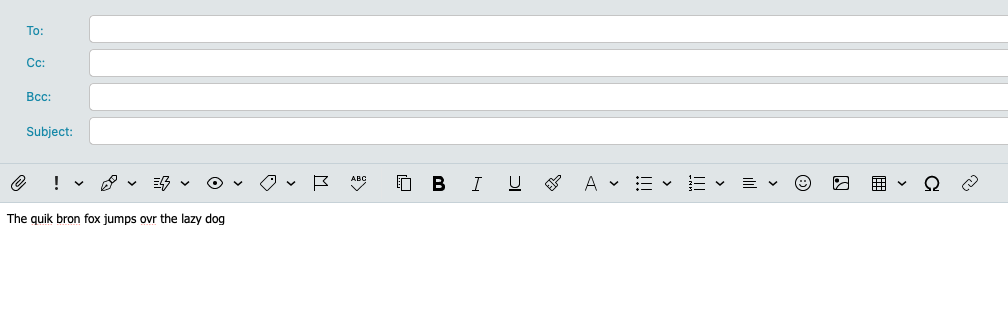
Is it possibly to have it auto spell check, but not auto correct? I get really tired of it auto correcting what it thinks I’m spelling.
If I turn off automatic spell-checker, then it doesn’t auto correct nor underline misspelled words.
I’d like it to have the feature where it just underlines it with the red squiggly (just like it does in this text box I’m typing this post in) and I can right click the real misspelled words to change it.
I feel like it used to be this way, but maybe not.
I’d like it to have the feature where it just underlines it with the red squiggly (just like it does in this text box I’m typing this post in) and I can right click the real misspelled words to change it.
I feel like it used to be this way, but maybe not.
I’m sure it still does do that and doesn’t just automatically correct. I will test mine later.
Ok i tested the latest eM Client V10.3.2622 for Mac and V10.3.2619 for Windows and yes by default when you type with automatic spell checking enabled eM Client picks up words that don’t match its dictionary with a red wavy line for you to “right click on to choose the correction or add your own custom word” to the dictionary as per the eM Client documentation link below.
“You can either choose to use automatic spell check (the system language will be used), or select the language manually from the list. The spell-checker works pretty much in the same way that you are used to (from MS Word etc.). It will underline the words that do not match its dictionary. By right-clicking the underlined word, you access a list of suggestions and you can also choose to add the word into the dictionary to avoid its being underlined again and again. To save time you can click on Check Spelling in Tools, the following window will pop up”
"Red wavy line appearing under composed words that don’t match the dictionary.
Ah, I checked at home on a PC and it is as you say, So this morning I checked on my mac and it’s actually influenced by the MacOS system settings under All input Sources in Spelling and prediction: