I have no clue why, but for some reason, it’s taking forever for the messages to load. I’ve gone and used another email client, and when I launched that email client, the messages are loaded very quickly. I’ve tried deleting the cache. I’ve tried re-syncing. I am not sure what the problem is. I can’t figure out how to troubleshoot this, except go with the new email client.
Mac Mini M2 Pro, macOS, Tahoes 26.1
eM Client: 10.4.5647 (73db7f1).
I have no clue why, but for some reason, it’s taking forever for the messages to load.
If you have an IMAP or Exchange account, try enabling to “download messages for offline use including attachments” as in the below V9 & V10 IMAP acct examples. That normally speeds up loading time of messages.
(eM Client V10 example) to download messages for offline use including attachments
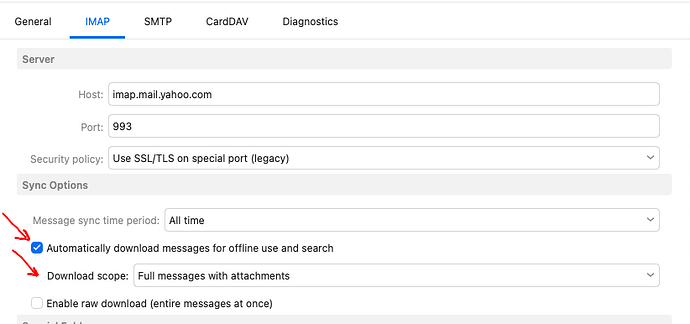
(eM Client V9 example) to download messages offline use including attachments.

If that still makes no difference then you can “try creating a new database” incase your current database is the problem.
To do that “first close eM Client” and then rename the following hidden database folder to eg eM Client-Old .
(Hidden database folder Mac)
/Users/User Name/Library/Application Support/eM Client
Then reopen eM Client and setup new. If you have an IMAP, Exchange, Office 365 or iCloud account all your messages, contacts, tasks etc will come back from the server. Then see if that fixes it.
If creating a new database then works ok, but you need data out of your original database due to you have a eg: POP account or Messages etc in Local folders, then see the below webpage on how to do a partial restore in offline mode which explains that part way down the following page.
Lastly also sometimes background memory resident programs can interfere with mail clients and cause problems such as eg: optionally installed Antivirus programs scanning mail or optionally installed Firewall / Security programs or VPNs. So if you have anything like that installed other than what comes default with your OS, try completely disabling those to test as well.
1 Like
Thank you for the suggestions. The first one, I had already checked those boxes. The one with the next suggestion, rebuilding the new database, I’ll tackle that later on. It seems to be running a little better today. But I’ve got this message bookmarked. Thanks again.