Please let me try to help.
First. let me say that I am an eM Client user just like you and I may not always have the answer you want. Next, let me state that I have tried a lot of email clients, and overall, I think eM Client is one of the best two out there when you consider all the functions it performs and the help you get from its Forum.
If I understand you correctly, you are having an issue with the way eM Client Settings / Mail /Compose Mail Format and Preferred Style preferences are working when you are composing an email.
When you state “randomly change between plain text and html”, do you mean that:
- It is happening as you are typing new text in a new email, or
- It is happening when you copy something from somewhere else and paste it in the email you are working on?
If it is #1, I must admit I have never had that problem in the 5 years I have been using this product.
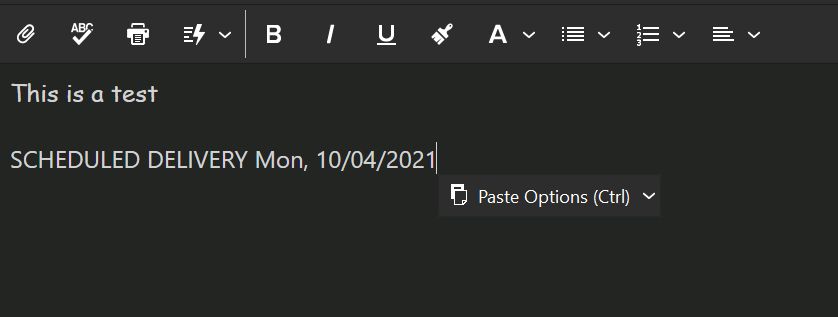
If it is # 2, that could be caused because eM Client is picking up the font of the copied test. When you do a Paste, you should see a pop-up that lets you pick how you want to paste the text when you click on the down v. - “Paste” or “Paste Formatted” (depending on how you accessed the Paste function) - Uses the font of the copied test. Whereas “Paste Text” - Uses the font already in use in you email. (See Below).
Does that help or confuse the issue? 