How do I get rid of pictures that come in on my emails? I have clicked on download pictures but if I dont like them how do I get rid of them?
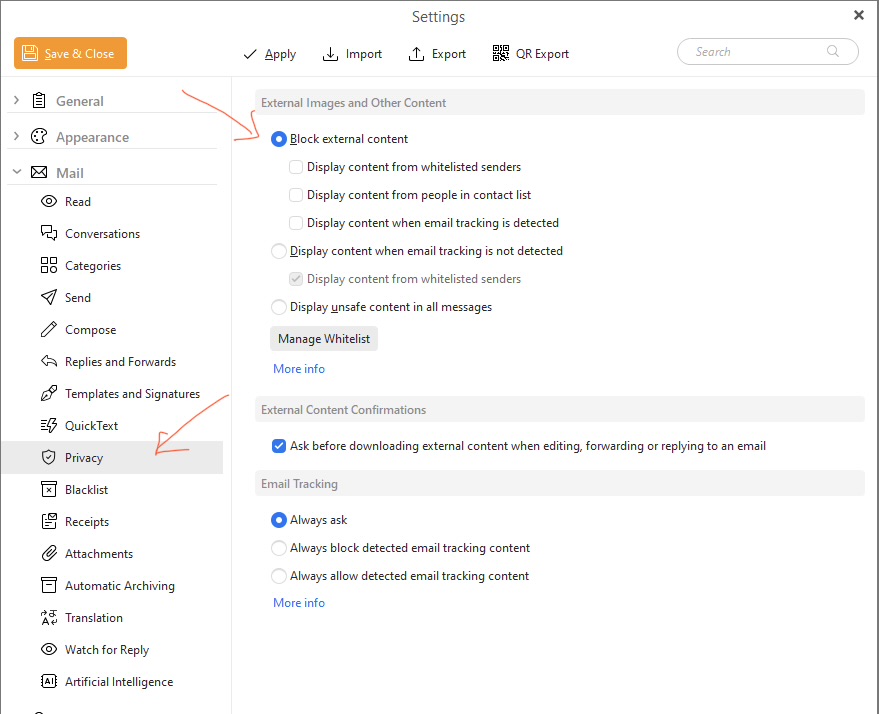
Go to “Menu / Settings / Mail / Privacy” where you can set to block all external content for all emails at the top if you don’t want to display any external images.
Or you can set to “display content from people in a whitelist”, or “display from people in a contact list”, or “when tracking is detected or not detected”.
eM Client Privacy Settings documentation
1 Like
Thank you, I am trying to not see pictures I had previously allowed. Because I did not know what the pictures contained I allowed them, now I want to block them and not see them but continue to see the message.
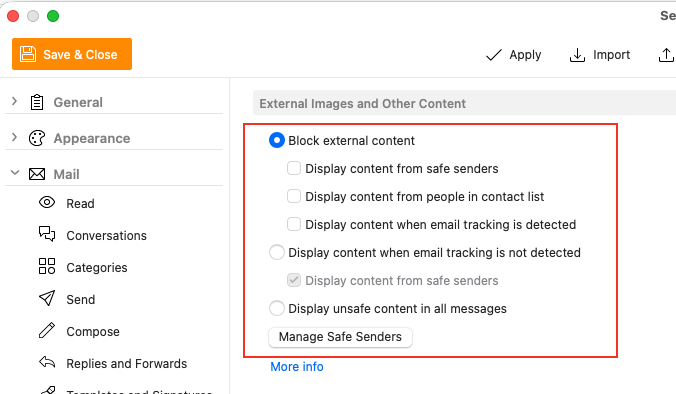
You can allow or disable external image content “as i mentioned” for senders by reading the following eM Client page which explains the various Privacy settings including Safe Senders.
“External Images and Other Content”
Quick guide to blocking options for external content in eM Client
https://www.emclient.com/external-content
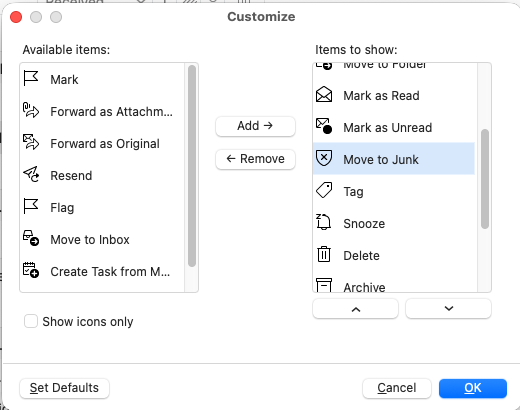
If you don’t want that senders email anymore at all, you can also block them by “right clicking on a Toolbar button and click Customise” and then add the “Move to Junk” button.
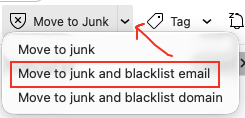
Then just click on that senders email and “click the dropdown on the right of Move to Junk” and click “Move to junk and blacklist email” so you don’t get that senders email in your inbox.
Alternatively you can “right click on the senders email subject” and click Move to junk on the dropdown, and also select Move to junk and blacklist email on the pop out menu.