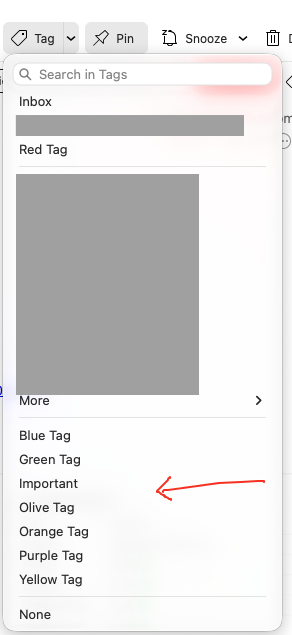
The reason why it’s a bit of a disappointment for me is that when I select my tags, all the colors of the tags in the drop-down window that were there in the previous versions are now gone. They do reappear once I select the tag, but the color of the tags in the drop-down window themselves are not there anymore.
It’s all a bland black and white, which is a big disappointment, now eM Client is treating me like a dog (just a playful humor). Maybe for others you might be laughing, but honestly, the older you get, the more you love living colors.
Please bring back the colored tags in the drop-down menu.
Thank you kindly.
This old dog praying to see color in eM Client tags drop-down menu some day again.
Yes the Dropdown Tag Colours are not there in Local Folders anymore using any theme on V11.0.1201 on Mac OS 27.0.l as per first screenshot example below with the Modern Theme
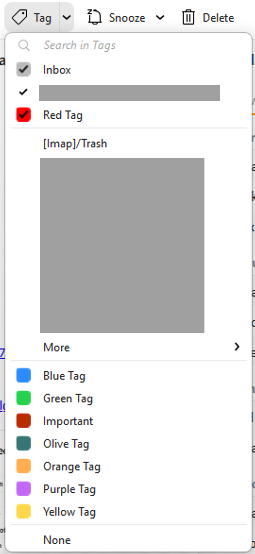
However using V11.0.1201 & Windows 11 Pro i do see the Local Tag colours with the Modern Theme as per the second example screenshot below. So just seems to be a Mac problem.
“Mac screenshot no local tag colours” Gmail account
Hey, thanks for this update message. Unfortunately, when I check my Mac desktop version for updates, it says I’m up to date, 11,1267. So I’m assuming I have to go to the website to download the 1389 version.