Win 11, Ver 10.4 5642
Is there something I can do to alter to speed up the Inbox refresh?
I also have this issue both on my Windows PCs and my Macs. I noticed this especially on my gmail mailboxes.
Mine are also Windows and Gmail accounts.
Yes - as of 3 days ago, the latency has become terribly problematic. Have rebuilt/reinstalled Gmail account a few times, as well as eM Client. Did note a new version of eM Client on website and downloaded that (not yet pushed through regular update). Also revoked and reauthorized Gmail OAuth.
Tested connection via another PC-based email client, and no problem.
As long as eM Client is fully synced locally, slow to receive mail is usually an external problem with either the sending or receiving mail server, or the connections between you and the sending server that might be experiencing technical issues, or you might have some background resident program interfering with the client, or you might have an Internet connection speed issue.
So first check that your internet speed hasn’t dropped incase that’s gone slow which sometimes can happen if you have a eg: dynamically assigned ip address and it’s gone stale. If it has gone slower than normal, power off your computer and modem / router for eg: 2 mins and then power back on and see if that fixes it.
Next if your internet speed is normal speed, then in eM Client click the dropdown on the right of Refresh and click Show Operations and see if it’s still synching. If it’s still synching wait till thats finished and then see if eM Client receives mail at normal speed
Next if it’s not synching anything and still receiving mail slower then normal, then if you are running any eg: optionally installed firewall / security programs, or optionally installed antivirus programs or vpn “other than what comes default with your os” then try completely disabling those to test incase of any interference.
If you have nothing optionally installed like the above or you do but disabling makes no difference then I would next contact the sending server technical support and also your mail server technical support to see if they are aware of any problems either end. eg: Recently I had slow receiving mail with one IMAP account, and it turned out to be my mail server issues with my mailbox that was resolved in a few days time.
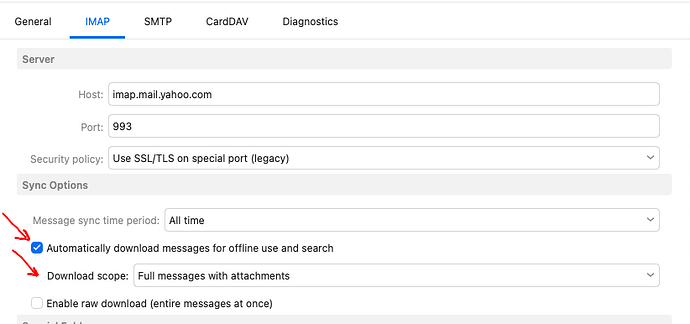
Now if you are referring to emails that receive ok but are slow to load / appear, then if you have IMAP or Exchange configured account, you can also speed up the loading of messages and attachments by going to “Menu / Accounts” and clicking the “IMAP or Exchange” tab and enable to automatically download messages for offline use etc as per the below V10 example.
The issue seems to be syncing folders. I have a lot folders and just deleting one email in one folder starts a sync which seems to take over long.