Is there any way I can increase the size of the text or change the font
You can do some customization of the text if you go to Menu > Settings > Appearence > Lists.
The text size in menus cannot be changed and will still be very small and hard to read. IMHO, i think the overall readability still is better in Outlook, Classic or New. Better and bolder font there.
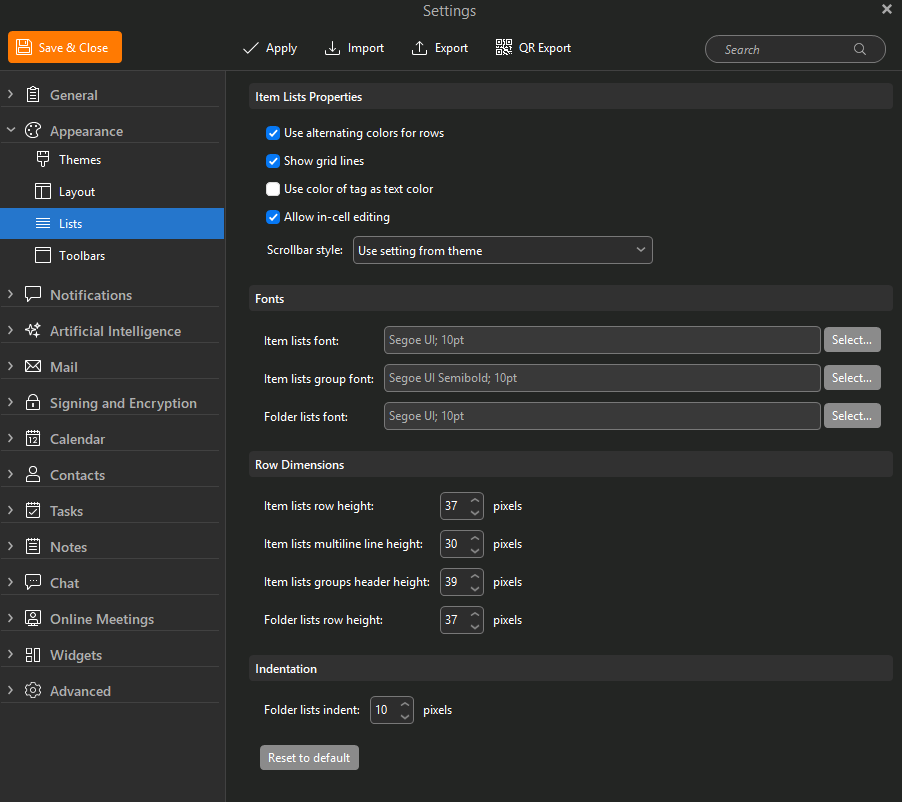
Apart from changing the Font and Size in settings you can also do the following.
Pressing “Ctrl & + or - keys” to zoom an email in or out on PC, or press the “Command & + or - keys” to zoom an email in or out on Mac.
You can also press the “Ctrl key & use the mouse Scroll wheel” up and down to zoom an email in or out on PC,
Or on Mac press the “Option key & use the mouse Scroll wheel” up and down to zoom an email in or out.
To reset the Zoom you can press Ctrl + 0 key on PC or press Command & Option + 0 key on Mac.
Or “Right click in the email" and select “Zoom / Increase or Decrease".
1 Like