Hi,
I have a bunch of emails, some of them already with a certain tag.
How do I add that tag to ALL items?
If I click the tag again, it UNSETS the tag instead of adding it. I then have to click the tag again to add the tag to all items. Not a big deal with 10 emails, bigger deal with 1000+ emails.
Is there a way to just add a tag? I tried ctl-click, shift-click, alt-click, none seem to work.
I have a bunch of emails, some of them already with a certain tag.
How do I add that tag to ALL items?
To add another tag to existing emails that already have tags you can do it via drag and drop.
First “Highlight / Select your emails” using “Shift or Ctrl/Cmd”.
Then “Drag and Drop” the selected emails “directly onto the preferred tag” listed in your left sidebar. That will then add the new tag to all selected emails. If you want to add more tags, just drag the selected emails to other tags.
If you don’t see your Tags in the left sidebar and have V10, go to “Menu / Settings / General / Folders” and check “Tags in Mail” & Save & Close.
Also if you are using the mobile app and have an iPad and an external B/T keyboard, “click on the first email you want to tag” and then “hold down the shift key”. Then while holding the shift key, “press the down arrow” to select all your emails you want to tag, or just manually click on all the emails you want tagged if you only want specific emails in the list.
Then either “right click on any of the selected emails & click Tag” on the dropdown menu and add / select your tag, or “click the 3 horizontal dots at the top right of the body and select Tag”. Then add your new tag you want.
1 Like
Sweet, the drag onto tags works a treat. Thanks for the pointers.
Issue seems to be that those are only the local tags, not the tags of the 4 email accounts I am using. The list would also be very long if all those tags were included. But it’s a start. 
Issue seems to be that those are only the local tags, not the tags of the 4 email accounts I am using.
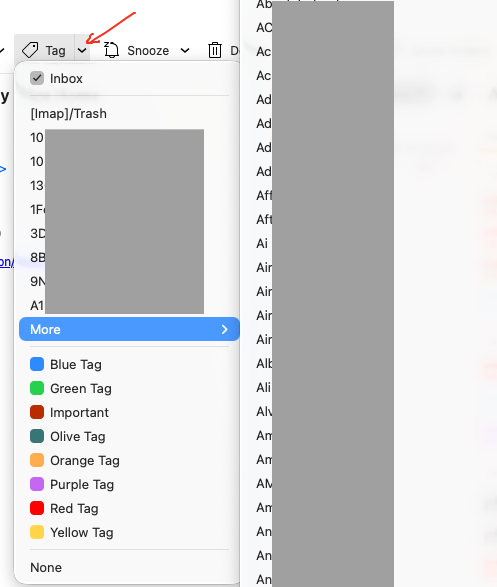
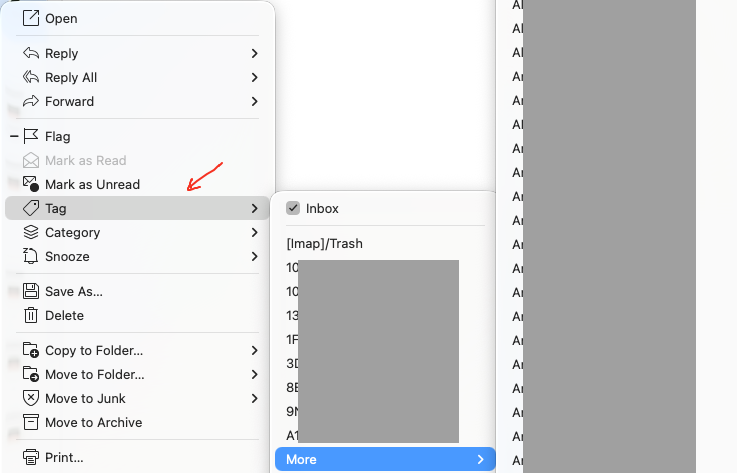
If you want to add more Server tags to existing emails with Server tags using the Desktop, then after selecting your emails, then either click the “Tag menu” along the toolbar or right click any of your selected emails and and click “Tag” on the dropdown, and you can then select whatever server tags you want to add to any existing tagged emails as in this Gmail account example below. As long as your server is supported you should be able to add multiple tags this way.
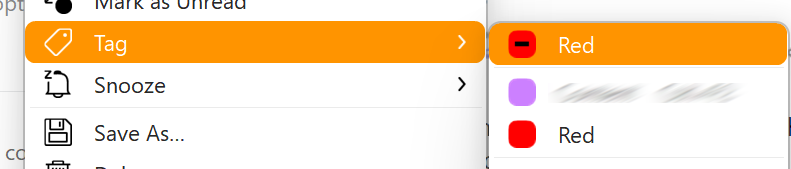
If you have a selection of emails that you want to apply a tag to, but some already have that same tag, you will see the “-” option to remove it first, that is true.
But that also means you have that tag ready at the top to use.
I think the fastest solution for you will be to press and hold CTRL key while you click that “-” sign, and then just click that same tag again (essentially double-click it).
Holding CTRL will keep the tag list open so you can easily just resolve this with 2 clicks to unassign from some emails, but then right away assign it to all in the selection.
2 Likes
It deletes the tag first, because there is said tag already assigned.
So far the only solution is to delete the tag and then add the tag again.
Yup, seems indeed the only option. Other email clients - or software that does a form of tagging - usually ADD a tag to existing tags instead of deleting. EmClient handles that differently.
Well, not the only option, even in my screenshot you can see the same tag is in the list twice - at the top with the removal option and below in the “normal” list - if you use that other option, it will add the tag directly to the emails that are missing it.
I recommended the Ctrl&double-click option because you mentioned you have a long list of tags, so finding that tag might take time and the double-click option might be faster.
You can just find the tag lower in the list and assign it directly.
1 Like
It doesn’t delete existing tags for me personally when adding other new tags.
You can add as many tags you like to any existing emails that already have tags. If your existing tags are deselecting when you add other tags then could be to do with your specific accounts or the way you are adding tags or a problem with your account or possibly your eM Client version.
So if you have tried adding tags as @Olivia_Rust advised, update what mail accounts you have. Also what version of eM Client you are using.
As per the topic “How to add tag to items (emails) when some already have that tag assigned?”
It deletes the tag that was already partially assigned. When clicking again, it adds the tag again to ALL emails. The question was if it was possible to add the tag to all emails without deleting it first and the answers seems to be NO.
Accounts in use:
- 1x Outlook.com (Airsync)
- 2x Office365 (EWS)
- 2x IMAP
- 1x Gmail
Emclient 10.4.5326
When you say it deletes the tag “that was partially assigned” what do you mean by Partially ?
The question was if it was possible to add the tag to all emails without deleting it first and the answers seems to be NO
Yes you can do that as I and @Olivia_Rust advised above.