I had to reinstall windows recently. I don’t know if thats related to the problems with eM client. It’s stopped everything, each time I open it, it asks for authorization through Google. It won’t move beyond this and If I click on it it asks me to sign into Google which I do, but nothing happens. I don’t get my mail and if I go out of eM client and back in it does the same thing. I reinstalled it, but to no avail. Not very computer literate. Can someone help me get it back working again please.
Thanks
I had to reinstall windows recently. I don’t know if thats related to the problems with eM client. It’s stopped everything, each time I open it, it asks for authorization through Google. It won’t move beyond this and If I click on it it asks me to sign into Google which I do, but nothing happens
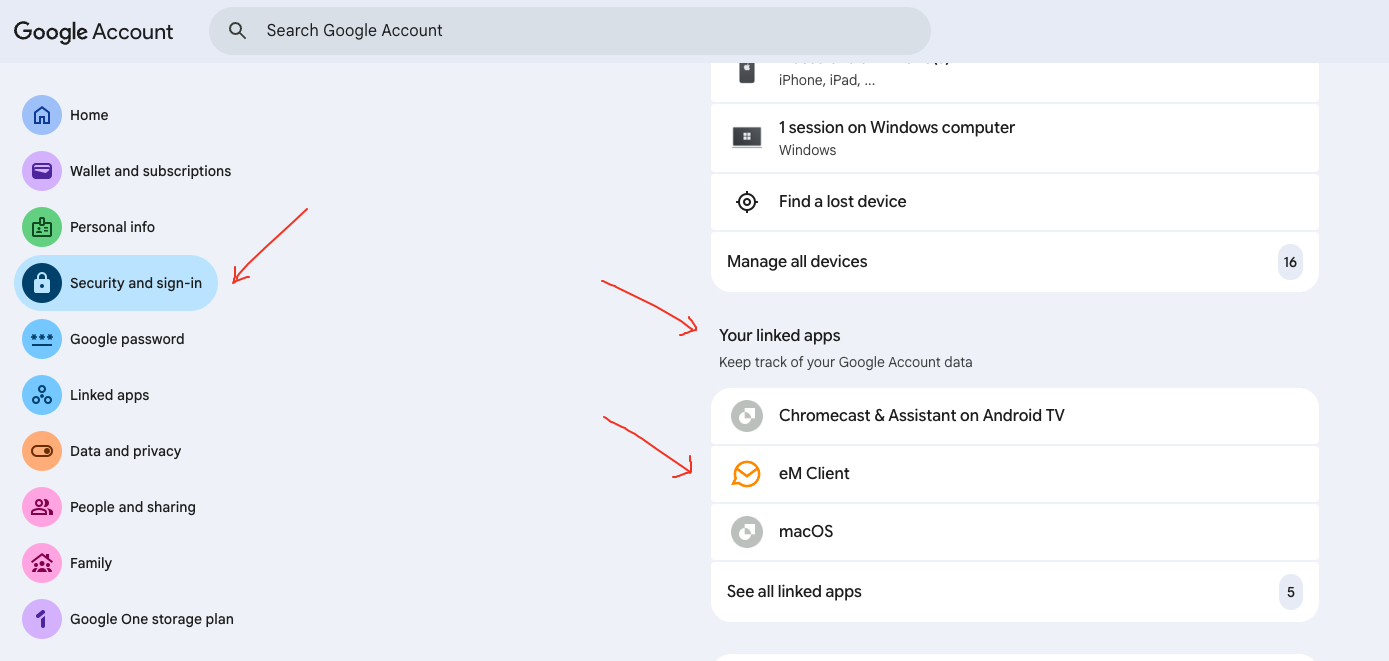
If you open eM Client and its constantly wanting to authorise access to your Google Account but nothing is happening, then “try closing eM Client” and going to your “Google Account / Linked Apps section” and “remove / revoke” the eM Client OAuth token as per example screenshot below.
Once the eM Client OAuth token is removed from Google, “then reopen eM Client” and you should get the prompt again to re-allow eM Client access to your Google account.
Also you will usually see “after allowing eM Client access” a popup at the very top of the browser with a checkbox to always open eM Client. So if you see that make sure you click / check that box.
If still nothing happens when you try that “and toggling around your various open windows show nothing to allow eM Client”, then “try setting another browser as default” and then close and reopen eM Client and then see if it will authorise. As might be your current browser problem.
“Google Linked Apps”