Hi Kelly1,
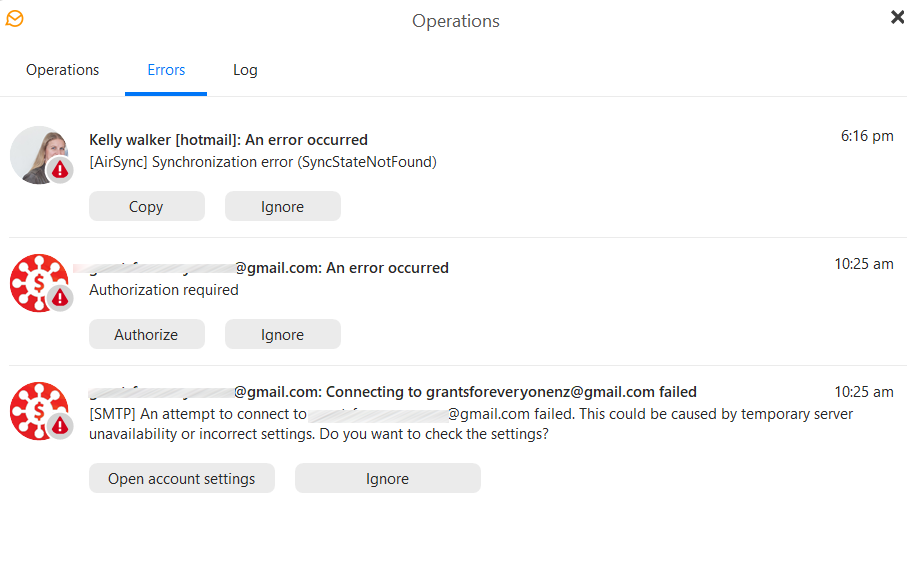
Thanks for the screenshot. There are two separate things here.
Gmail (sending): Google needs you to sign in again.
- In the Operations window, click Authorize next to “Authorization required”.
- Sign in to your Gmail account in the Google window that opens and allow all requested permissions.
- Try sending again.
If sending still fails, go to Menu > Accounts, select the Gmail account and open the SMTP tab. The server should be smtp.gmail.com, port 465, with SSL/TLS. If it still doesn’t work, remove the Gmail account and add it again with Menu > Accounts > Add account (automatic setup). Your mail stays on Google’s server.
Hotmail (AirSync error): eM Client 11 connects Outlook.com/Hotmail accounts in a new way (Microsoft Graph). The old connection from version 10 causes this error. To fix it:
- Sign in at outlook.com in your browser and check that your emails and folders are there.
- To be safe, make a backup in eM Client: Menu > Backup…
- Remove the Hotmail account in Menu > Accounts.
- Add it again with Menu > Accounts > Add account (automatic setup) and sign in through the Microsoft window. Your mail stays on Microsoft’s server.
If anything still fails, please post a new screenshot of the Operations window and your eM Client version (Menu > Help > About).