Hi. I have two Windows 11 PCs and an Android phone. Right now, my second PC isn’t syncing correctly. It’s showing emails in the inbox that I already dealt with and deleted or filed into folders.
When I try to file them again into folders from this device, I get a message that these emails were not completely downloaded, and can’t be moved.
Is there a way to force redownload or re-sync so that these can move to the folders I put them in (on another device)?
If one of your computers is out of sync and you have an IMAP, Exchange. Graph, Office 365 or iCloud acct “right click on your Inbox” (or All Mail if it’s Gmail) and click “Properties” at the bottom. Then click the “Repair” tab at the top & click Repair.
That clears the local cache and resyncs your mail from the server. Messages will be slower to reread till fully cached locally again.
If that doesn’t fix it then next go to “Menu / Accounts” and remove and readd your account.
If that still won’t sync then if you have any eg: optionally installed firewall / security programs or optionally installed antivirus programs or vpns “other than whatever comes default with your os”, try completely disabling those to test.
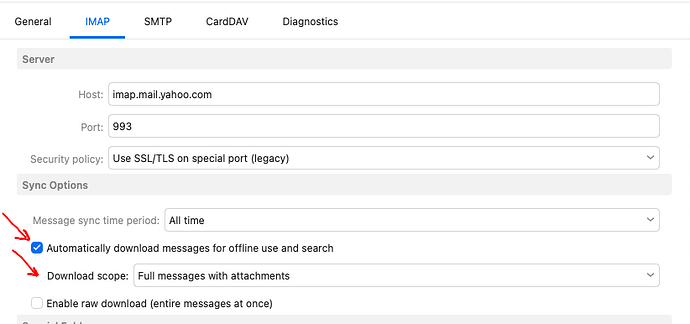
Lastly you can speed up downloading messages and attachments in your account as per the following V10 IMAP account example.
(Download messages for offline use including attachments)